

Support
24/7 Technical Support & Solution Center
We are here with all the resources of the Prota Support Center to ensure your projects using ProtaStructure Suite products continue without interruption.
What Kind of Support Can You Get?
Support Services
Software Usage (Next-Generation Solutions)
Learn everything you are curious about regarding all tools and advanced functions of the software, and accelerate your projects.
Error and Technical Reports
Receive fast and solution-oriented support for unexpected issues or technical errors you encounter.
Knowledge Base & Training Videos
Before creating a support request, you can review our Knowledge Base (KB) articles and training videos for quick solutions.
Request Creation Screen
Guide to Using the Request Creation Screen
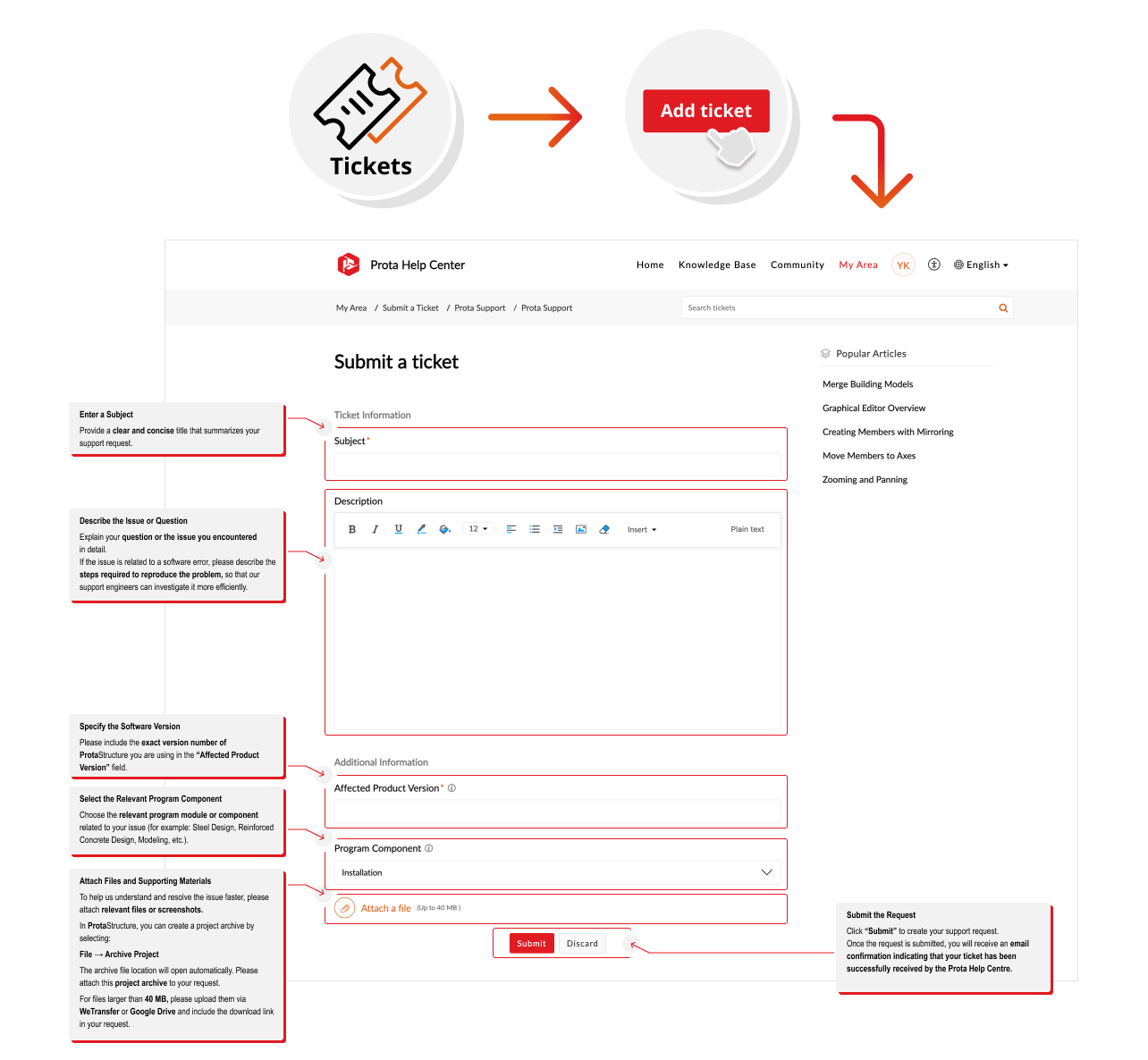
Prota Support Guide
Step-by-Step Guide to Submitting a Ticket
Go to Tickets
Log in to the Prota Help Center, click on the “Tickets” section, and then select “Add ticket”.
Enter a Subject
Provide a clear and concise title that summarizes your support request.
Describe the Issue or Question
Explain your question or the issue you encountered in detail. If the issue is related to a software error, please describe the steps required to reproduce the problem so that our support engineers can investigate it more efficiently.
Specify the Software Version
Please include the exact version number of ProtaStructure you are using in the “Affected Product Version” field.
Select the Relevant Program Component
Choose the relevant program module or component related to your issue from the list, such as Steel Design, Reinforced Concrete Design, Modeling, or Installation.
Attach Files and Supporting Materials
To help us understand and resolve the issue faster, please attach relevant files or screenshots. In ProtaStructure, you can create a project archive by selecting File → Archive Project. For files larger than 40 MB, please upload them via WeTransfer or Google Drive and include the download link in your request.
Submit the Request
Click the “Submit” button to create your support request. Once submitted, you will receive an email confirmation indicating that your ticket has been successfully received by the Prota Help Centre.
About the Support Process
Response Time
Our support engineers respond to your requests within 16 business hours at the latest.
Approval System
When your request reaches us, an automatic notification email will be sent to you.
Tracking
You can view all your requests under the “Requests” section and track the resolution process.
Ready to submit a ticket?
Log in to the Prota Help Center to submit and track your support requests. Best regards, Prota Software Technical Support Team.