



Yapısal BIM modelleme, çoklu malzeme analizi, kodlara uygun tasarım ve akıllı çizim üretimi için eksiksiz entegre ortam.
— hepsi tek bir pakette.
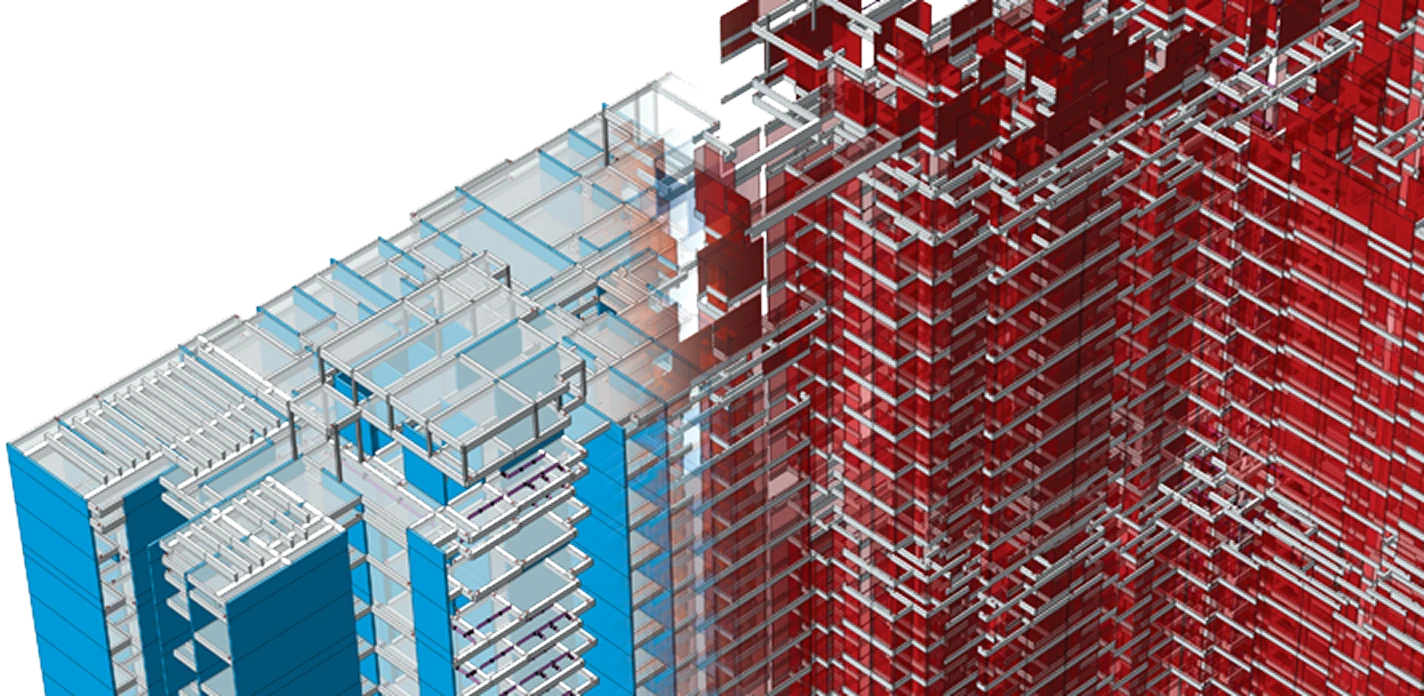
Mühendisler Tarafından, Mühendisler İçin Tasarlandı
Beş yetenek.
Tek entegre iş akışı.
ProtaStructure, yapısal tasarımın her aşamasını — ilk modelden kodlara uygun çıktıya kadar — tek bir BIM ortamında birleştirir. Veri aktarımı yok, araç değiştirme yok, sürüm kayması yok.

Daha Hızlı Tasarım Süreleri Elde Edin
Yük kombinasyonlarını, yük alanlarını ve çizim çıktısını otomatikleştirin. Yeni analiz motoru 4 kat performans artışı sağlar; projenin tamamı günler değil dakikalar içinde tamamlanır.

Değişiklikleri Kolayca Yönetin
Mimari revizyonlar yapısal modele otomatik olarak yansır — yeniden veri girişi yok, sürüm çakışması yok.

Akıllı Çizimler Üretin
BIM modelinden doğrudan üretilen, tam açıklamalı donatı ve taşıyıcı sistem çizimleri; otomatik donatı çizelgelemesiyle birlikte.

Tasarım Dokümantasyonunu Teslim Edin
Her aşamada üretilen yapılandırılmış hesap raporları, kod kontrolleri ve teslim paketleri. Yeni PDF motoru 10 kata kadar daha hızlıdır; merkezî sistemle raporları sürükle-bırak ile sıralayabilir ve kapak sayfaları ekleyebilirsiniz.

Uluslararası Tasarım ve Sismik Kodlar
Eurocode, ACI, BS, AISC, TBEC, IS, AS ve bölgesel sismik yönetmelikler dahil 50'den fazla küresel standarda göre tasarım. En güncel IS 1893-2025 ve Tayland DPT 1302-61 de destekleniyor.
BIM Öncelikli Yapısal Mühendislik
Yapısal Ekipler İçin Geliştirilen
BIM Çözümlerini Keşfedin
ProtaStructure, yapısal mühendislere ilk model geometrisinden nihai kodlara uygun tasarım ve dokümantasyona kadar tek bir entegre ortam sunar. Her iş akışı adımı aynı BIM veritabanında kalır; birbirinden kopuk araçlar kullanmaktan kaynaklanan veri kaybını ortadan kaldırır.
Yapısal elemanları doğrudan BIM ortamı içinde tanımlayın. Geometri, özellikler ve malzeme atamaları içe aktarılmış geometri değil, canlı veridir.
Doğrusal, P-Delta, tepki spektrumu ve doğrusal olmayan analizler çalıştırın. Beton, çelik ve ahşap elemanları aynı oturumda tasarlayın.
ProtaStructure artık kapsamlı soğuk şekillendirilmiş çelik tasarımını destekliyor: soğuk şekillendirilmiş elemanları ayrı bir uzman yazılıma ihtiyaç duymadan doğrudan platform içinde modelleyin, analiz edin ve tasarlayın. AISI S100, Eurocode EN 1993-1-3 veya ÇYTHYE/TSC2016'ya göre tasarım yapın; burkulma, eğilme, kesme ve bileşik etkiler için tüm kontroller Doğrudan Dayanım Yöntemi (Direct Strength Method) ile yapılır.
Yapısal çizimler, donatı çizelgeleri ve hesap raporları doğrudan modelden üretilir — her zaman güncel tasarım durumuyla eşgüdümlüdür.
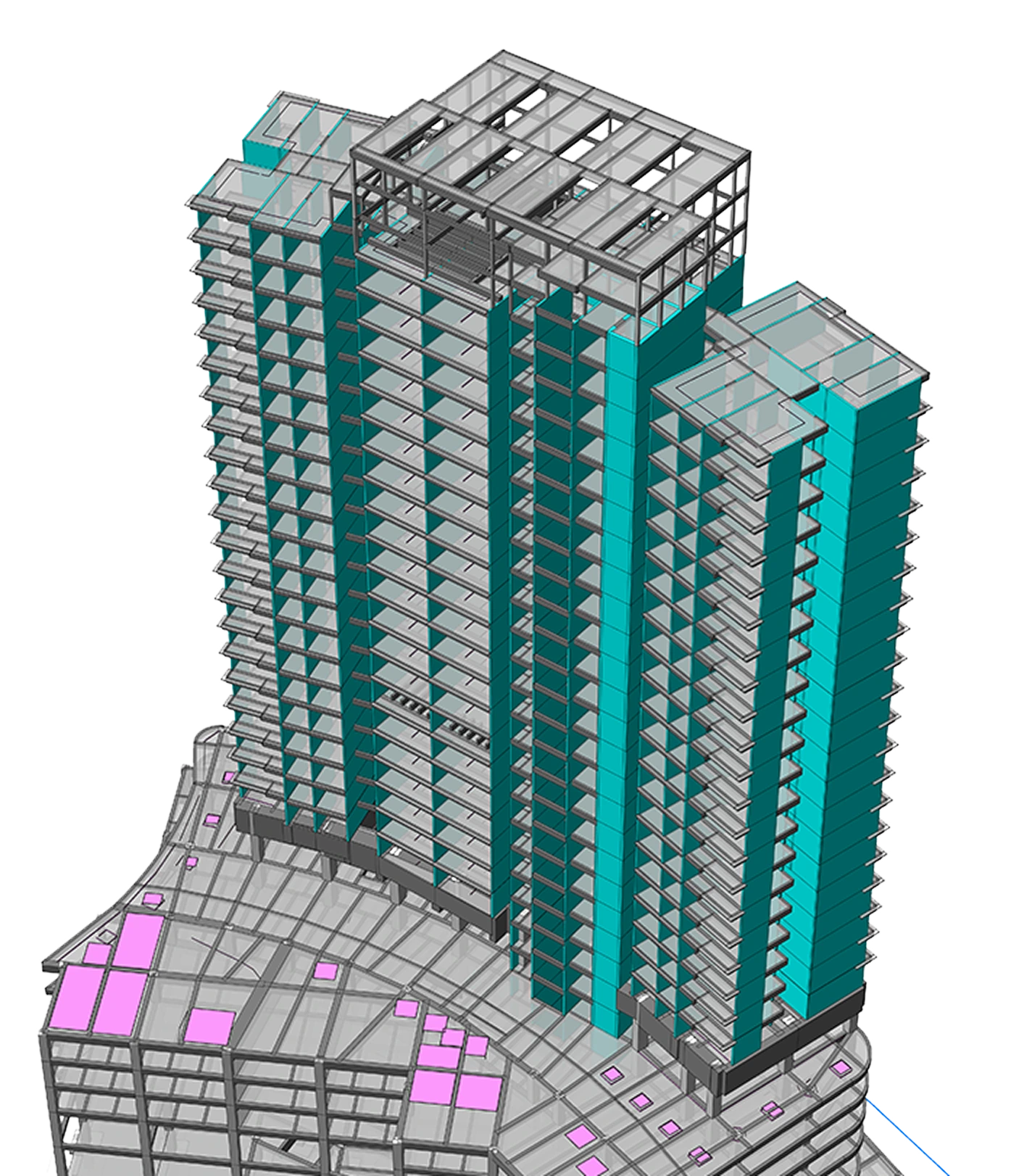
ProtaStructure'ı İş Başında Görün
Kapsamlı bir web seminerini izleyin — ProtaStructure Suite ile betonarme ve çelik yapıların modellenmesi, analizi, tasarımı ve detaylandırılması.

Eleman Tasarımı
Kapsamlı Eleman Tasarımı ve Kontrolleri
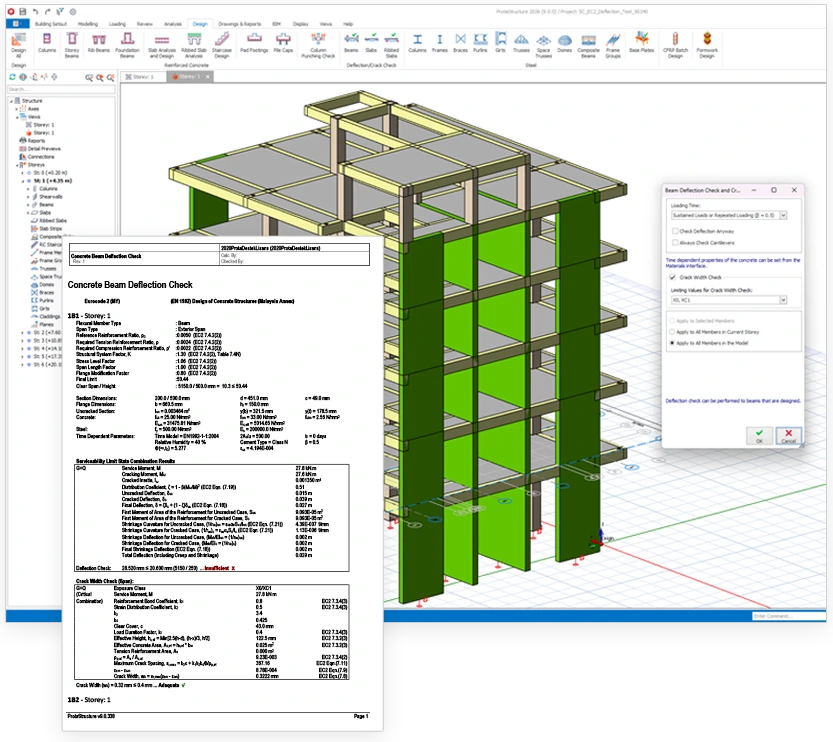
ProtaStructure analizin ötesinde, yerel ve uluslararası tasarım kodlarına uygunluğu sağlamak için ayrıntılı tasarım kontrolleri sunar. Buna, Eurocode 2'ye göre betonarme kirişler için sünme ve rötreyi otomatik olarak hesaba katan uzun dönem sehim kontrolleri de dahildir. Perdeler için ACI 318-19'a göre özel uç bölgesi (Special Boundary Element) gereksinimlerini otomatik olarak belirleyebilir, deprem tasarımında doğru süneklik koşullarını sağlayabilirsiniz. Yassı kiriş tasarımı, genişlik sınırlarınıza göre uygun düzeni otomatik seçerek yedi kollu etriyeye kadar destek sunar. Temel tasarımı ayrıca devrilme ve kayma stabilite kontrollerini içerir; güvenlik katsayısı sınırları seçilen tasarım koduna göre otomatik uygulanır.
Yük Editörü
Güçlü Etkileşimli Yük Editörü
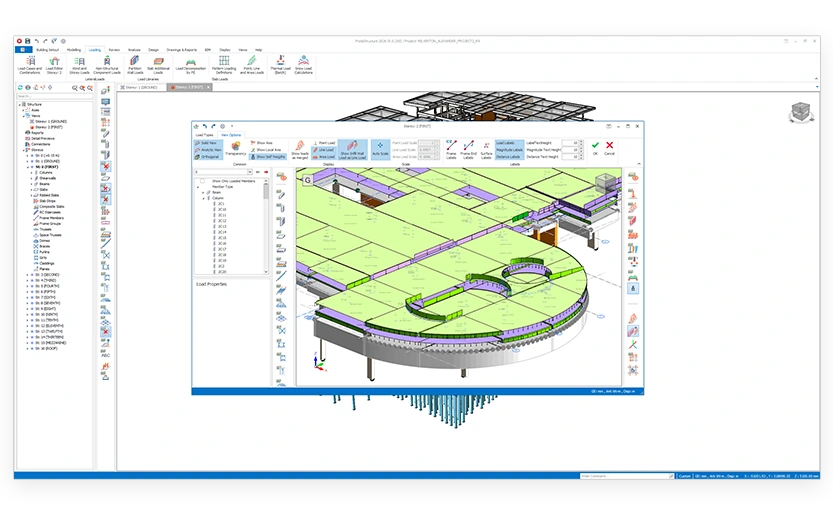
ProtaStructure, otomatik ve hassas yük analiziyle yapısal tasarımı hızlandırır; verimliliği ve doğruluğu artırır.
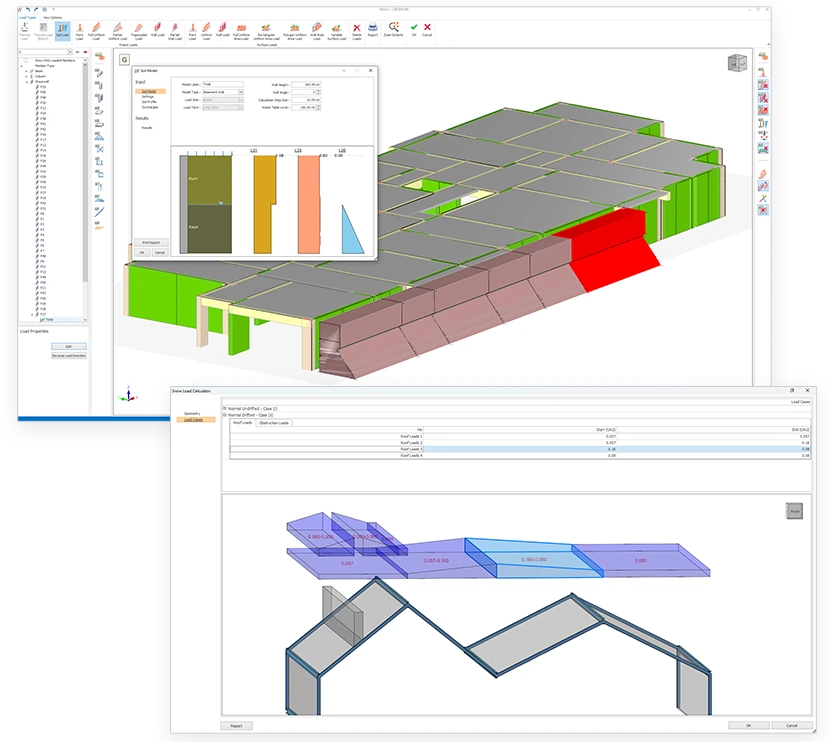
Otomatik hesaplanan yüklere ek olarak etkileşimli yük editörümüz; zemin itkisi, tekil, çizgisel ve alan yükleri dahil dilediğiniz ek yükleri her doğrultuda görselleştirip uygulamanıza olanak tanır. Kapsamlı toplu durum yönetimi için tekil yükleri Excel'den bile içe aktarabilirsiniz.
ProtaStructure; kar, yağmur ve çatı hareketli yükleri gibi çevresel yüklerin hesaplanmasını ve uygulanmasını büyük ölçüde basitleştirir.
Hem statik hem dinamik analiz için yeraltı su seviyesini ve zemin profillerini dikkate alarak yapılara etkiyen zemin itkisini değerlendirme araçları sunar.
Yük Hesapları
Otomatik Yük Hesapları
ProtaStructure; yük değerlendirmeleri, kaplamalar ve yapısal boyutlar için renk kodlu görsel kontroller eşliğinde, çeşitli geometri ve yükleme senaryolarını destekleyerek Akma Çizgileri ve Sonlu Eleman Ayrıştırması gibi gelişmiş yöntemlerle farklı döşeme sistemlerinin düşey yüklerini zahmetsizce dağıtır.
ProtaStructure; EN 1991-4, EN 1998-1, ASCE07, BS6399-2 ve daha fazlası gibi başlıca uluslararası kodlara uygun olarak Deprem, Rüzgar ve Fiktif Yük hesaplarını, ayrıca EN1991-1-3 ve TS498'e göre kar yükü değerlendirmelerini otomatikleştirir.
Analiz ve kombinasyon sürecine sorunsuz biçimde entegre edilen zemin dinamik yük durumları ile kar birikmesi yük durumlarının otomatik üretiminden de yararlanabilirsiniz.
Tam otomatik yük kombinasyonu üretimiyle birleşen bu güçlü yük otomasyonları, size saatlerce değerli proje zamanı kazandırır.
BIM İş Birliği
Önde Gelen Yapısal BIM İş Birliği
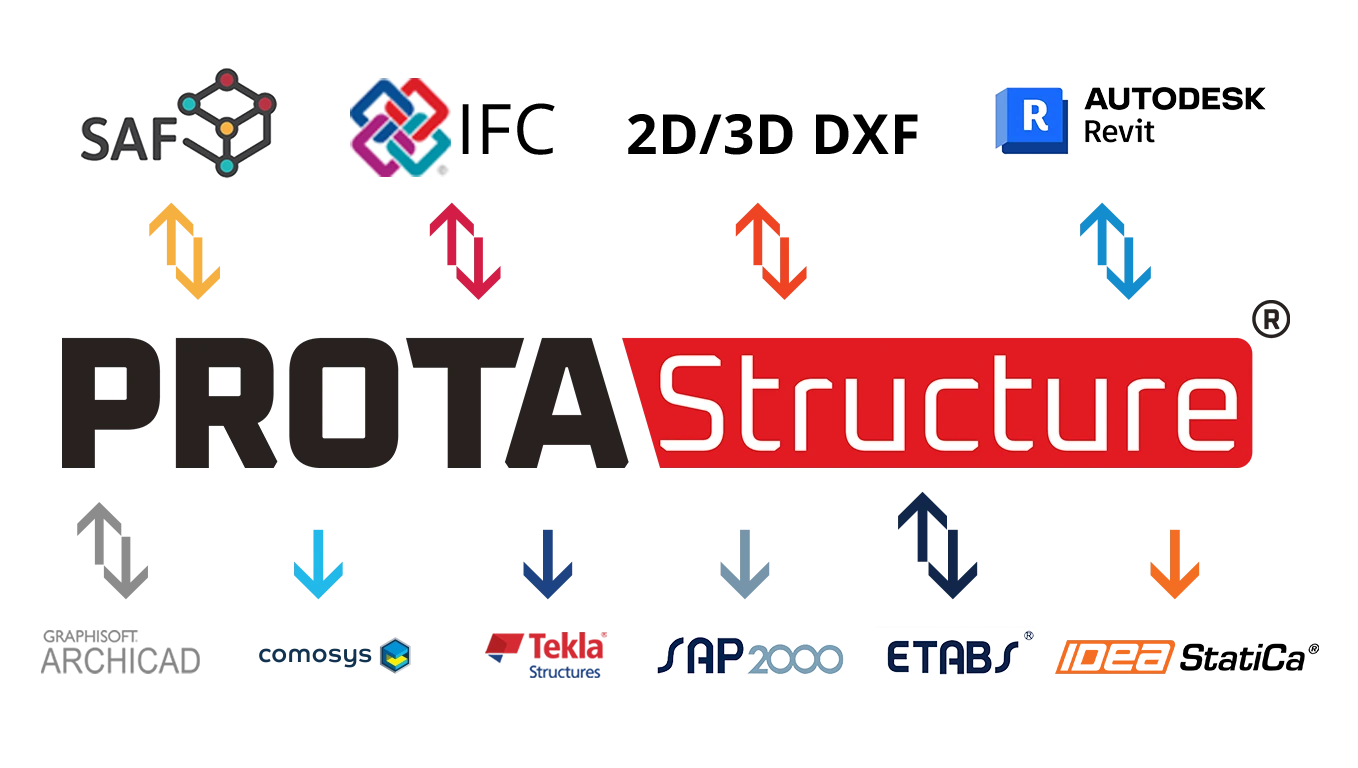
BIM göz önünde bulundurularak geliştirilen yazılımla; Autodesk Revit, Tekla Structures, ArchiCAD, AllPlan, IdeaStatica dahil diğer önde gelen BIM sistemleri ve IFC, 2D/3D DXF ve SAF dahil en güncel veri formatlarıyla modelleri sorunsuzca paylaşın ve geliştirin. IdeaStatica ile güçlü bağlantı, gelişmiş birleşim analizi için çelik birleşim geometrinizi ve iç kuvvetlerinizi aktarmanıza olanak tanır.
Tasarım Modülleri
Güçlü Entegre Tasarım Modülleri
ProtaStructure, verimliliğinizi önemli ölçüde artıracak tam entegre modüller de içerir:
Etkileşimli Betonarme Merdiven Modülü: Betonarme merdiven modülümüzü sunmaktan mutluluk duyuyoruz. Bu yenilikçi özellik, yaygın tiplerden oluşan bir kütüphaneden betonarme merdivenleri etkileşimli olarak modellemenize ve eksiksiz bir sonlu eleman analizi için bina modeline sorunsuzca entegre etmenize olanak tanır. Ardından kol ve sahanlıkların tasarımı, ayrıntılı raporlar ve çizimlerle birlikte otomatikleştirilir.
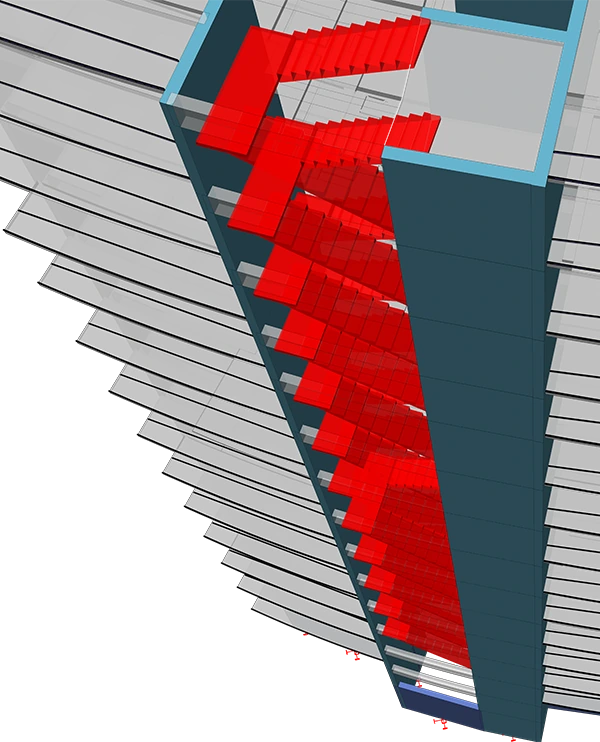
Spiral Merdiven Modülü: İç kenarından ve/veya kol uçlarından mesnetlenen spiral merdivenleri, yapının geri kalanıyla aynı entegre ortamda modelleyin ve tasarlayın. Uzun süredir talep edilen bu özellik, spiral merdivenleri analiz, tasarım ve detaylandırmayla birlikte BIM iş akışına tam olarak dahil ediyor.
Çelik Taban Levhası Modülü: Kapsamlı bir makro; çelik taban levhalarını doğrudan ProtaStructure içinde eklemenize, modellemenize ve tasarlamanıza olanak tanır. Bu güçlü araç; taban levhası ve ankraj tasarım sürecini ACI318, AISC360, Eurocode'lar ve Türk kodlarına göre hızlandırarak saatlerce iş yükünden tasarruf sağlar.
BIM Modelleme
Gerçek Yapısal BIM Modelleme
Dinamik girişi kullanarak Betonarme kirişleri, kolonları, döşemeleri, temelleri ve perdeleri ile özel biçimli çekirdek perdelerini ve kolonları hızla oluşturun. Projenizi tam olarak tanımlamak için boşlukları, düşük döşemeleri ve fiziksel yerleşimi belirleyin.
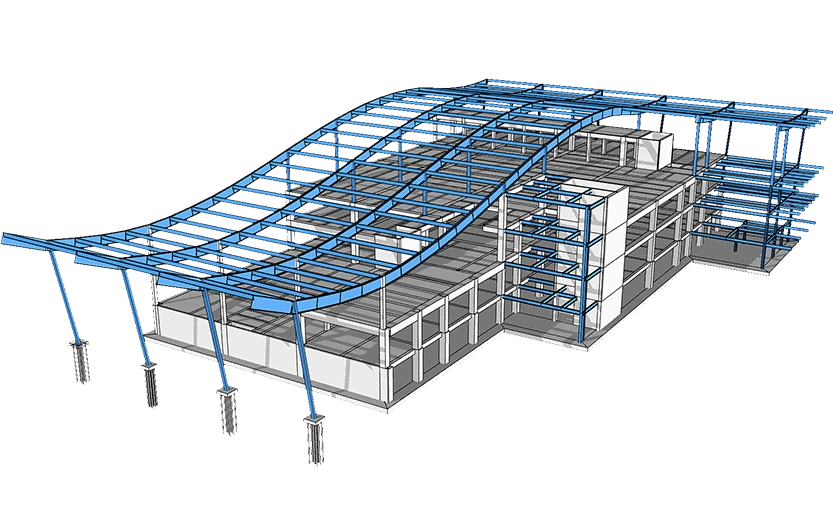
Esnek parametrik makrolarla kafes, aşık, çapraz, kuşak ve gergi çubukları dahil gerçek yapısal Çelik ve Kompozit elemanlar kullanın. Çelik kolonlar, kirişler ve kafeslerdeki ek yerlerinizi belirleyin.
Bu yetenekler; temel seviyesinde bodrum perdeleri modelleme ve tasarlama, karmaşık çift simetrik haç kesitli kolonlar oluşturma ve çelik kolonların altına betonarme temel pedestallerini sorunsuzca ekleyip tasarlama olanağıyla genişletilmiştir.
Büyük ve karmaşık modellerde adlandırılmış seçim grupları oluşturup bunlara istediğiniz eleman kombinasyonunu atayabilir, tüm grubu tek bir kısayolla anında yeniden seçebilirsiniz; bu da revizyonları ve değişiklik yönetimini önemli ölçüde hızlandırır.
Tek model kurun! ProtaStructure, karmaşık veya basit betonarme ve çelik binaları hızlı ve kolay biçimde modellemenize olanak tanır.
Teknik Özellikler
ProtaStructure'ı kurumsal kullanım için değerlendiren BT yöneticileri, satın alma ekipleri ve mühendisler için eksiksiz platform ayrıntıları.

| Özellik | Detaylar |
|---|---|
| İşletim Sistemi | 64-bit Windows 10 veya üzeri |
| Bellek (RAM) | En az 8 GB RAM |
| Disk Alanı | En az 1 GB boş disk alanı |
| İşlemci | Daha iyi performans için çok çekirdekli işlemci önerilir |
| Ekran | Minimum 1280 × 720 veya daha yüksek ekran çözünürlüğü |
| Ekran Kartı | OpenGL ve DirectX destekleyen, en az 1 GB video belleğine sahip harici bir GPU |
| Yazılım | Microsoft .NET Framework 4.5 veya üzeri |
Uluslararası Kodlar & Standartlar
ProtaStructure, sınıfındaki en geniş uluslararası kod kütüphanesiyle gelir. Araç değiştirmeden veya üçüncü taraf modüller içe aktarmadan beton, çelik, sismik ve temel mühendisliği için yerel standartlara göre tasarım yapın.
Tüm Kodları Görüntüleyin →Gelişmiş Deprem
Mühendisliği
ProtaStructure, özel projelerinizdeki gelişmiş deprem mühendisliği gereksinimleri için uzman araçlar sunar.
Performans Değerlendirmesi ve Güçlendirme
ProtaStructure; doğrusal olmayan tek modlu itme, çok modlu itme ve doğrusal olmayan zaman tanım alanı analizleriyle desteklenen, eleman bazında tam ayrıntılı değerlendirme raporu içeren, ASCE/SEI 41-17'ye göre bina performans değerlendirmesi ve güçlendirmesi için benzersiz bir iş akışı sağlar. ASCE 41'e ek olarak bu güçlü özelliklerin tamamı artık doğrusal olmayan analizler ve q katsayısı yaklaşımı dahil Eurocode 8-Bölüm 3 (EN 1998-3:2005) prosedürleriyle tam uyumludur. Bu, mühendislerin Eurocode 8 gereksinimlerine göre kapsamlı bina değerlendirmeleri ve güçlendirme tasarımı yapmasına olanak tanır.
Kolon, kiriş ve perde kesitleri yayılı plastisite kullanılarak lif elemanlarla modellenebilir ve Moment-Eğrilik ilişkilerini elde etmek için en gelişmiş tekniklerle analiz edilebilir.
Sismik izolatörler, çeşitli izolasyon senaryoları için yapının herhangi bir noktasına yerleştirilebilir. Doğrusal olmayan izolatör özellikleri zaman tanım alanı analizine dahil edilebilir. Tasarım çıktıları; kat ötelenmelerini, ivmeleri, iç kuvvetleri ve izolatör yer değiştirmelerini içerir.
Binalarınızın performansa dayalı tasarımı, değerlendirmesi ve güçlendirmesiyle birlikte yeni doğrusal olmayan statik, çok modlu itme ve zaman tanım alanı analizlerinden yararlanın.
Çatlamış ve çatlamamış kesit özellikleri, farklı yük durumları için aynı analizde eş zamanlı olarak kullanılabilir. Kod modifikasyon varsayılanları kesit özelliklerine otomatik olarak uygulanabilir.
Sıkça Sorulan Sorular
Merak Edilen Sorular
ProtaStructure Suite, Prota Software tarafından yapısal mühendisler için geliştirilmiş gelişmiş bir yapısal BIM yazılım çözümüdür. Betonarme ve çelik binaların modelleme, analiz, tasarım ve detaylandırma süreçleri için entegre bir ortam sunar.
Paket; yapısal analiz, betonarme tasarımı, çelik tasarımı, detaylandırma ve BIM iş birliği için güçlü araçlar içerir. ProtaStructure, mühendislerin hem basit hem de karmaşık yapısal projeleri daha yüksek doğruluk ve koordinasyonla verimli biçimde tamamlamasına yardımcı olur.
ProtaStructure'ın ve Prota Software'in daha geniş teknoloji çözümleri yelpazesinin başlıca kullanıcıları arasında yapısal mühendislik firmaları, tasarım ofisleri, mühendislik danışmanlık şirketleri, mühendislik öğrencileri ve üniversiteler yer alır.
ProtaStructure, aşağıdakiler dahil birçok bina yapısı türünün tasarımında kullanılabilir:
- Betonarme binalar
- Çelik yapılar
- Kompozit yapılar
- Yüksek katlı binalar
- Konut ve ticari binalar
- Endüstriyel tesisler
- Havalimanı terminalleri, hastaneler, üniversiteler, stadyumlar ve benzeri yapılar gibi büyük ölçekli projeler
Evet. ProtaStructure hem küçük projeleri hem de karmaşık çok katlı binaları ele alacak şekilde tasarlanmıştır. Güçlü analiz motoru, mühendislerin büyük yapısal modeller üzerinde verimli çalışmasına olanak tanır.
ProtaStructure; Avrupa, Asya, ABD ve Latin Amerika genelinde kullanılan çok geniş bir uluslararası tasarım ve sismik kod yelpazesini destekler; bunlara ACI, AISC, Eurocode'lar, IBC, UBC, Türk kodları, Endonezya kodları, Filipinler kodları, Hindistan kodları, Kolombiya kodları, Peru kodları ve Dominik Cumhuriyeti kodları dahildir ancak liste bunlarla sınırlı değildir.
Yazılım, mühendislerin yerel yapı yönetmeliklerine uygun tasarım yapmasına olanak tanır.
ProtaStructure Suite'in tasarım kodu kapsamını bu sayfadan inceleyebilirsiniz:
Uluslararası Tasarım Kodları ve Standartlarını Görüntüleyin →
Evet. ProtaStructure Suite, BIM tabanlı bir iş akışı etrafında inşa edilmiştir; yapısal mühendislerin analiz, tasarım ve detaylandırma için tek bir entegre modelle çalışmasına olanak tanır.
Bu yaklaşım koordinasyonu iyileştirmeye, mükerrer işleri azaltmaya ve daha verimli proje teslimine yardımcı olur.
ProtaStructure'ı web sitesindeki Satış Ekibiyle İletişim formunu göndererek satın alabilirsiniz. Form gönderildikten sonra bölgenizdeki resmi Prota Software ofisi veya yetkili satıcı ile iletişime geçirilirsiniz.
Prota Software ürünlerinin yalnızca resmi Prota Software ofisleri ve yetkili satıcılar tarafından satılabildiğini lütfen unutmayın.
Lisans paketinizi istediğiniz zaman yükseltebilirsiniz. ProtaStructure Suite Professional Paketini seçtiyseniz, dilediğiniz zaman ProtaStructure Enterprise Paketine yükseltme yapabilirsiniz.
Prota Software satış ekibiyle iletişime geçmek ve bir yükseltme teklifi talep etmek için Satış Ekibiyle İletişim çevrimiçi formunu doldurmanız yeterlidir.
Formu gönderdikten sonra bölgenizdeki Prota Software ofisi veya yetkili satıcı ile iletişime geçirilirsiniz.
Evet. Prota Software, yıllık aboneliklerde ve kalıcı lisanslarda indirimler sunar ve zaman zaman özel kampanyalar düzenler.
Güncel kampanyalar ve teklifler hakkında bilgi almak için satış ekibiyle iletişime geçebilirsiniz.
Evet. Prota Help Center ve Başlangıç Rehberi sayfası üzerinden video eğitimlerine, teknik makalelere, temel eğitim kılavuzlarına ve öğrenme kaynaklarına erişebilirsiniz.
Ayrıca İsteğe Bağlı Çevrimiçi Eğitim sayfası üzerinden ücretli eğitim programları da sunuyoruz. Bir eğitim kursu satın aldıktan sonra dersleri dilediğiniz zaman izleyebilir ve gerektiğinde yeniden dönebilirsiniz.
Buna ek olarak, kullanıcıların becerilerini daha da geliştirmelerine yardımcı olmak için düzenli olarak web seminerleri ve canlı eğitim oturumları düzenlenmektedir.
Bakım Aboneliği, ProtaStructure Suite yatırımınızın zaman içinde en yüksek değeri sunmaya devam etmesini sağlamak için tasarlanmıştır. Başlıca avantajları şunlardır:
- ProtaStructure Suite'in en son sürümüne doğrudan erişim
- Gelecekteki fiyat artışlarına karşı koruma ve geç yenileme ücretlerinden kaçınma
- Tüm yazılım güncellemelerine otomatik ve ücretsiz erişim
- Uzman ekibimizden öncelikli, sınırsız teknik destek
- Prota Help Center'daki kapsamlı e-öğrenme kaynaklarına sınırsız erişim
- Özel Prota Software etkinliklerine, web seminerlerine ve kullanıcı oturumlarına ücretsiz davetler
Aktif bakım aboneliği bulunan lisanslı kullanıcılar, öncelikli ve sınırsız teknik destek alır.
Teknik destek şu kanallardan sağlanır:
- Prota Help Center destek portalı
- Prota teknik destek mühendisleriyle doğrudan iletişim
- Yetkili Prota Software satıcılarından destek
Evet. Herhangi bir yatırım yapmadan önce yazılımın yeteneklerini keşfedebilmeniz için web sitemizde ProtaStructure'ın 30 günlük ücretsiz deneme sürümü sunulmaktadır.
Deneme sürümünü doğrudan Prota Software web sitesinin ana sayfası üzerinden talep edebilirsiniz.
ProtaStructure Suite'i başlattığınızda sizi bir etkinleştirme ekranı karşılar. Ürününüzü etkinleştirmek için aşağıdaki adımları izleyin:
- ProtaStructure Suite için kullanacağınız bilgisayarın internete bağlı olduğundan emin olun.
- Yazılımı denemek istiyorsanız etkinleştirme penceresindeki "Denemek İstiyorum" düğmesine tıklayın ve Prota Software'den aldığınız deneme etkinleştirme kodunu girin.
- Eğitim sürümünü kullanmak istiyorsanız etkinleştirme penceresindeki "Öğrenciyim" düğmesine tıklayın ve Prota Software'den aldığınız eğitim etkinleştirme kodunu girin.
- Bir lisans satın aldıysanız etkinleştirme penceresindeki "Zaten Satın Aldım" düğmesine tıklayın.
- Prota Software'den satın aldığınız ürün sürümünü seçin.
- Prota Software'den aldığınız Etkinleştirme Kodunu girin.
- Etkinleştir düğmesine tıklayın.
Prota Help Center, Prota Software tarafından ProtaStructure Suite ve diğer Prota ürünleri kullanıcıları için sunulan resmi çevrimiçi destek ve öğrenme platformudur.
Mühendislerin yazılımı daha hızlı öğrenmesine, teknik sorunları çözmesine ve yatırımlarından en yüksek verimi almasına yardımcı olmak için tasarlanmıştır.
Prota Help Center'ın Başlıca Özellikleri
- Bilgi bankası makaleleri
- E-Öğrenme Kaynakları ve Eğitimler
- Dinamik, self servis destek sistemi
- Destek Talep Sistemi
- Yapay Zekâ Destekli Aranabilir Destek Portalı
- Etkileşimli Kullanıcı Topluluğu Forumları
Prota Software'i sorunsuz çalıştırmak için sisteminiz aşağıdaki minimum gereksinimleri karşılamalıdır:
- İşletim Sistemi: 64-bit Windows 10 veya üzeri
- Bellek (RAM): Minimum 8 GB RAM
- Disk Alanı: En az 1 GB boş disk alanı
- İşlemci: Daha iyi performans için çok çekirdekli bir işlemci önerilir
- Ekran: Minimum 1280 × 720 veya daha yüksek ekran çözünürlüğü
- Ekran Kartı: OpenGL ve DirectX destekleyen, en az 1 GB video belleğine sahip harici bir GPU (ProtaStructure ve ProtaDetails'daki gelişmiş görselleştirme özellikleri için gereklidir)
- Yazılım Gereksinimi: Microsoft .NET Framework 4.5 veya üzeri (Windows otomatik güncelleme önerilir)
Bu gereksinimleri karşılamak veya aşmak, ProtaStructure Suite ile çalışırken akıcı ve verimli bir deneyim sağlamaya yardımcı olur.
Daha büyük ve daha karmaşık projelerle çalışırken en iyi performans için aşağıdaki sistem özelliklerini öneririz:
- İşletim Sistemi: 64-bit Windows 10 veya üzeri
- İşlemci: Intel Core i7 çok çekirdekli işlemci veya eşdeğeri (daha yüksek saat hızı ve daha büyük CPU önbelleği daha iyi performans sağlar)
- Depolama: Daha hızlı yükleme ve proje işleme için yeterli boş alana sahip SSD (katı hal sürücüsü)
- Bellek (RAM): 16 GB veya daha fazla RAM önerilir
- Ekran: 1920 × 1080 veya daha yüksek çözünürlük
- Ekran Kartı: OpenGL ve DirectX destekleyen, en az 4 GB video belleğine sahip harici bir GPU
- Yazılım Gereksinimi: Microsoft .NET Framework 4.5 veya üzeri (Windows otomatik güncelleme önerilir)
Bu özellikleri karşılamak, ProtaStructure Suite kullanırken akıcı modelleme, analiz ve görselleştirme performansı sağlamaya yardımcı olur.

Mühendislik Mükemmeliyeti
Tasarım Daha Akıllı, İnşa Daha Güçlü
En zorlu projelerinde Prota Software'e güvenen dünya çapındaki 50.000+ yapısal mühendise katılın.