



Yapısal BIM modelleme, çoklu malzeme analizi, kodlara uygun tasarım ve akıllı çizim üretimi için eksiksiz entegre ortam.
— hepsi tek bir pakette.

Mühendisler Tarafından Mühendisler İçin Tasarlandı
En İyi Yapısal Mühendislik Yazılımı
Mühendisler Tarafından Mühendisler İçin Tasarlandı
Sizi kapsamlı destek ve öğrenme kaynaklarıyla güçlendiriyoruz.

BIM Platformları Arasında Senkronizasyon
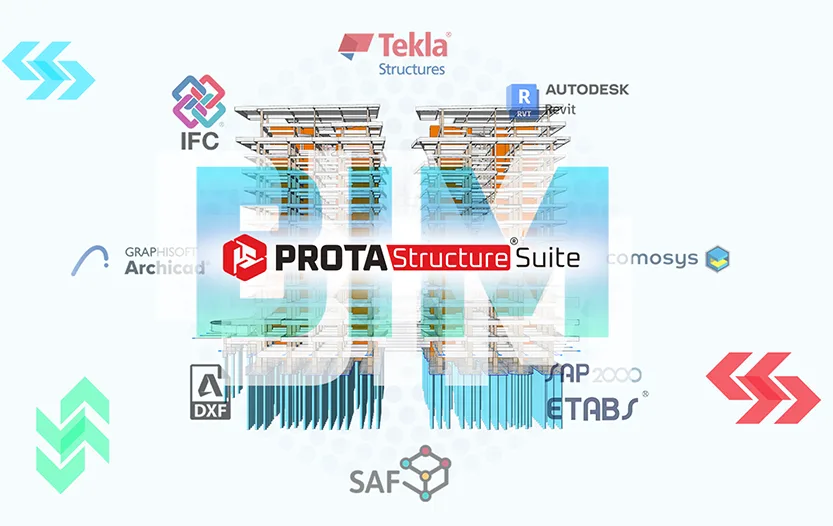
ProtaStructure; IFC, 2D/3D DXF ve SAF dosyalarının içe ve dışa aktarımını destekleyerek Autodesk Revit, ArchiCAD ve AllPlan gibi BIM platformlarıyla model paylaşımını kolaylaştırır.

Değişiklikleri Takip Edin ve Güncelleyin
Prota Software, doğrudan ve sorunsuz model koordinasyonunu kolaylaştırmak için Autodesk Revit ile özel bir entegrasyon geliştirmiştir; değişiklikleri gerçekleştikçe çift yönlü aktarmak ve senkronize etmek için araçlar sunar.

Tüm Taraflarla İş Birliği Yapın
BIM; mimarları, mühendisleri ve yüklenicileri, planlama, tasarım ve inşaat iş akışlarını iyileştiren ortak bir 3B model sürecinde bir araya getirir.

Kârlılığı ve Verimliliği En Üst Düzeye Çıkarın
ProtaStructure; kapsamlı modelleme, tasarım, koordinasyon ve dokümantasyon için akıllı fiziksel nesneler kullanarak kesintisiz bir BIM iş akışını destekler.

Birinci Sınıf Destek
Sizi sınırsız birinci sınıf destek ve öğrenme kaynaklarıyla güçlendiriyoruz.
Yapı Bilgi Modellemesi
BIM Nedir?
BIM, yani Yapı Bilgi Modellemesi; mimarları, mühendisleri ve yüklenicileri ortak bir 3B model sürecinde bir araya getirerek inşaatta devrim yaratır. Gelişmiş BIM yazılımları ve sertifikaları aracılığıyla planlama, tasarım ve inşaatı iyileştirir; inşaat mühendisliği ve yapım süreçlerinin tamamında fayda sağlar.
ProtaStructure, temelden yapısal BIM göz önünde bulundurularak tasarlanmıştır. Modelleme, tasarım, koordinasyon ve dokümantasyonu yönlendirmek için akıllı fiziksel nesneler kullanırız.
ProtaStructure; IFC, 2D/3D DXF ve SAF dosyalarının içe ve dışa aktarımını destekleyerek Autodesk Revit, ArchiCAD ve AllPlan gibi BIM platformlarıyla model paylaşımını kolaylaştırır.
Prota Software, doğrudan ve sorunsuz model koordinasyonunu kolaylaştırmak için Autodesk Revit ile özel bir entegrasyon geliştirmiştir; değişiklikleri gerçekleştikçe çift yönlü aktarmak ve senkronize etmek için araçlar sunar.
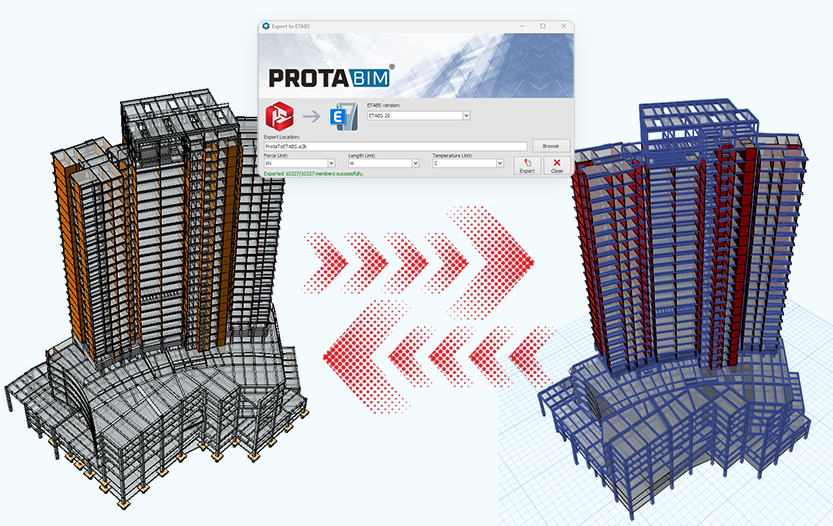
ProtaStructure; akıllı model bağlantıları aracılığıyla OpenSees, ETABS™ ve SAP2000™ gibi önde gelen platformlarla sorunsuz entegre olarak analiz doğruluğunu artırır; güvenilir doğrulama ve birlikte çalışabilirlik sağlar.

ProtaBIM'i İş Başında Görün
Kapsamlı bir web seminerini izleyin — ProtaStructure Suite ile betonarme ve çelik yapıların modellenmesi, analizi, tasarımı ve detaylandırılması.

BIM İş Birliği
ProtaStructure: Yapısal BIM Entegrasyonunun Zirvesi
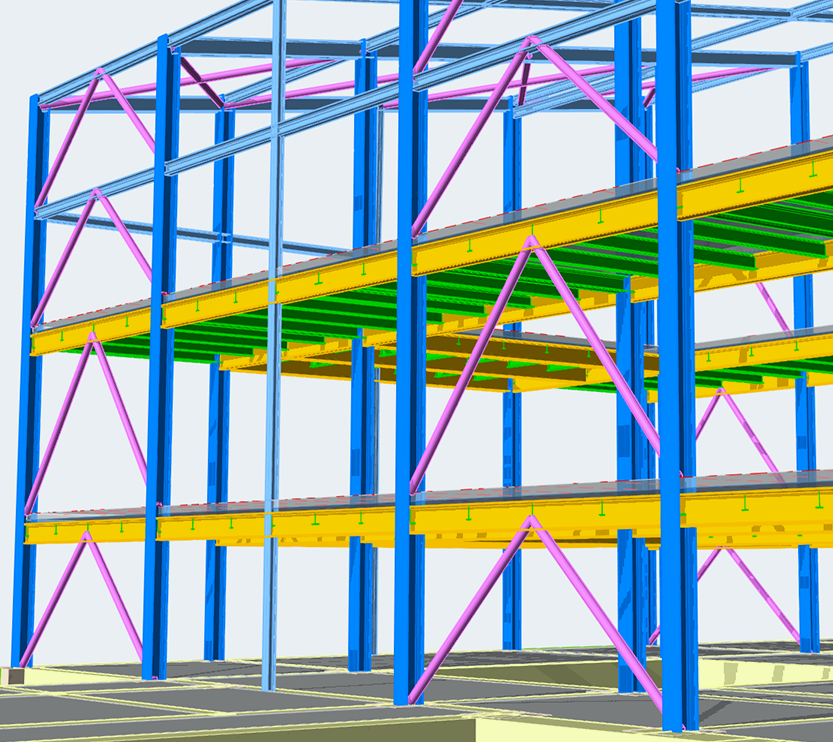
ProtaStructure, yapısal BIM'in özü olacak şekilde tasarlanmıştır; kapsamlı modelleme, tasarım, koordinasyon ve dokümantasyon için akıllı fiziksel nesneler kullanır ve kesintisiz bir BIM iş akışı sağlar.
Open BIM
Kapsamlı BIM Standardı Desteği
Endüstri standartlarına benzersiz destek sunar; Autodesk Revit, ArchiCAD ve AllPlan gibi önde gelen platformlarla IFC, 2D/3D DXF ve SAF dosyaları üzerinden model alışverişine olanak tanır ve iş birliğine dayalı çalışma ortamlarını teşvik eder.
Revit Entegrasyonu
Autodesk Revit ile Gelişmiş Entegrasyon
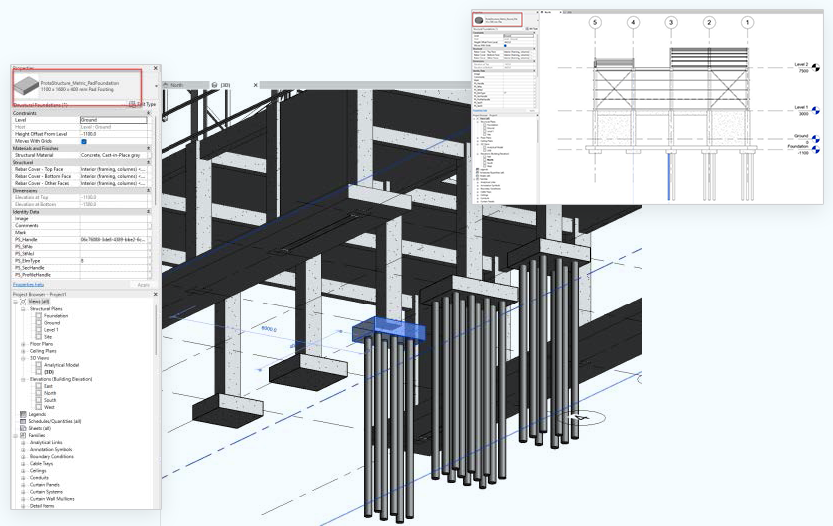
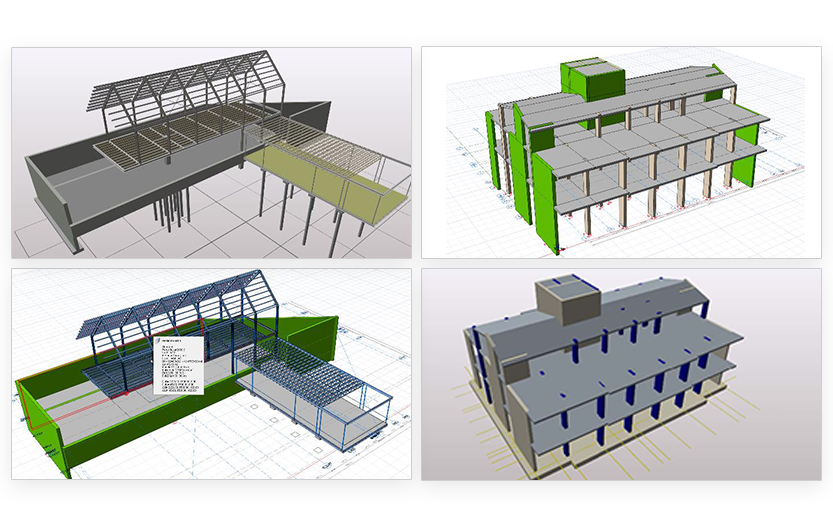
ProtaStructure, Autodesk Revit ile özel, çift yönlü bir entegrasyon sunar; BIM süreçlerinizi hızlandırmak için gerçek zamanlı senkronizasyon, revizyon görselleştirme ve özelleştirilmiş family eşleştirme araçlarıyla model koordinasyonunu güçlendirir.
Analiz Bağlantıları
Çok Yönlü Analiz Modeli İş Birliği
Mühendislikte kullanılan çeşitli analiz araçlarını göz önünde bulunduran ProtaStructure; OpenSees, ETABS™, SAP2000™, LUSAS™, IdeaStatica ve daha fazlasına akıllı bağlantılar sayesinde platformlar arasında sonuçların doğrulanmasını ve karşılaştırılmasını basitleştirir; projelerinizin endüstri ölçütlerini karşılamasını sağlar.
2D DXF İçe Aktarma
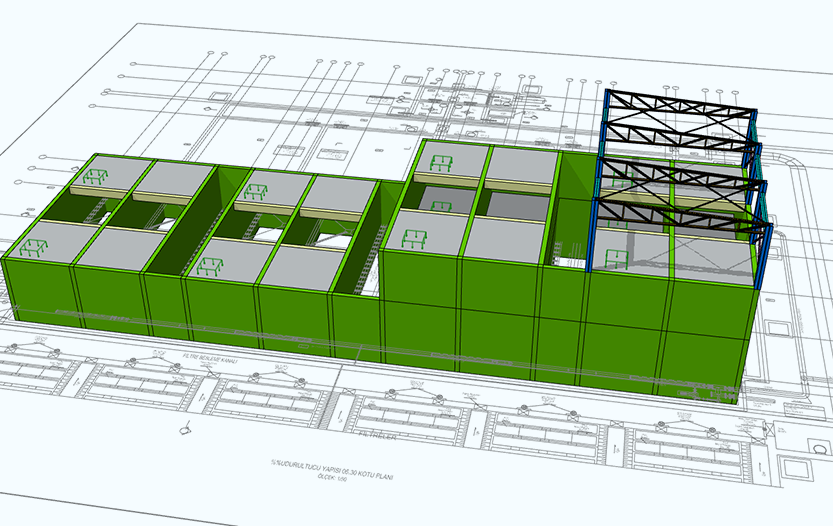
2D DXF Dosyalarından İçe Aktarma - Harici Referans Çizimi
ProtaHUB; yapısal ve mimari anahtar planlar gibi mevcut tüm 2B çizim bilgilerinden tam olarak yararlanmanıza olanak tanıyarak modellerinizi hızla kurmanızı ve koordine etmenizi sağlar.
Çıktı Raporlama
Verimli Model Oluşturma ve Çıktı Raporlama
Modelleme süreçleri, çizimleri fiziksel ProtaStructure modellerine dönüştürüp yükseltebildiğimiz DXF içe aktarma özelliğimizle dahi başlayabilir.
2B veya 3B girdilerden başlayarak ProtaStructure, çizimleri yapısal ve mimari elemanları kusursuz biçimde hizalayan ayrıntılı 3B modellere dönüştürebilir. Microsoft Office, PDF, DXF ve DWG gibi standart formatlarda özelleştirilebilir, görsel açıdan etkileyici rapor ve çizimlerin oluşturulmasını destekler. En iyi çizim pratiklerine bağlı kalarak katman, stil ve ölçeklendirmede esneklik ile özel şablon oluşturma seçeneği sunar; proje dokümantasyonu ve sunumuna özel bir yaklaşım sağlar.
Sıkça Sorulan Sorular
Merak Edilen Sorular
ProtaStructure Suite, Prota Software tarafından yapısal mühendisler için geliştirilmiş gelişmiş bir yapısal BIM yazılım çözümüdür. Betonarme ve çelik binaların modelleme, analiz, tasarım ve detaylandırma süreçleri için entegre bir ortam sunar.
Paket; yapısal analiz, betonarme tasarımı, çelik tasarımı, detaylandırma ve BIM iş birliği için güçlü araçlar içerir. ProtaStructure, mühendislerin hem basit hem de karmaşık yapısal projeleri daha yüksek doğruluk ve koordinasyonla verimli biçimde tamamlamasına yardımcı olur.
ProtaStructure'ın ve Prota Software'in daha geniş teknoloji çözümleri yelpazesinin başlıca kullanıcıları arasında yapısal mühendislik firmaları, tasarım ofisleri, mühendislik danışmanlık şirketleri, mühendislik öğrencileri ve üniversiteler yer alır.
ProtaStructure, aşağıdakiler dahil birçok bina yapısı türünün tasarımında kullanılabilir:
- Betonarme binalar
- Çelik yapılar
- Kompozit yapılar
- Yüksek katlı binalar
- Konut ve ticari binalar
- Endüstriyel tesisler
- Havalimanı terminalleri, hastaneler, üniversiteler, stadyumlar ve benzeri yapılar gibi büyük ölçekli projeler
Evet. ProtaStructure hem küçük projeleri hem de karmaşık çok katlı binaları ele alacak şekilde tasarlanmıştır. Güçlü analiz motoru, mühendislerin büyük yapısal modeller üzerinde verimli çalışmasına olanak tanır.
ProtaStructure; Avrupa, Asya, ABD ve Latin Amerika genelinde kullanılan çok geniş bir uluslararası tasarım ve sismik kod yelpazesini destekler; bunlara ACI, AISC, Eurocode'lar, IBC, UBC, Türk kodları, Endonezya kodları, Filipinler kodları, Hindistan kodları, Kolombiya kodları, Peru kodları ve Dominik Cumhuriyeti kodları dahildir ancak liste bunlarla sınırlı değildir.
Yazılım, mühendislerin yerel yapı yönetmeliklerine uygun tasarım yapmasına olanak tanır.
ProtaStructure Suite'in tasarım kodu kapsamını bu sayfadan inceleyebilirsiniz:
Uluslararası Tasarım Kodları ve Standartlarını Görüntüleyin →
Evet. ProtaStructure Suite, BIM tabanlı bir iş akışı etrafında inşa edilmiştir; yapısal mühendislerin analiz, tasarım ve detaylandırma için tek bir entegre modelle çalışmasına olanak tanır.
Bu yaklaşım koordinasyonu iyileştirmeye, mükerrer işleri azaltmaya ve daha verimli proje teslimine yardımcı olur.
ProtaStructure'ı web sitesindeki Satış Ekibiyle İletişim formunu göndererek satın alabilirsiniz. Form gönderildikten sonra bölgenizdeki resmi Prota Software ofisi veya yetkili satıcı ile iletişime geçirilirsiniz.
Prota Software ürünlerinin yalnızca resmi Prota Software ofisleri ve yetkili satıcılar tarafından satılabildiğini lütfen unutmayın.
Lisans paketinizi istediğiniz zaman yükseltebilirsiniz. ProtaStructure Suite Professional Paketini seçtiyseniz, dilediğiniz zaman ProtaStructure Enterprise Paketine yükseltme yapabilirsiniz.
Prota Software satış ekibiyle iletişime geçmek ve bir yükseltme teklifi talep etmek için Satış Ekibiyle İletişim çevrimiçi formunu doldurmanız yeterlidir.
Formu gönderdikten sonra bölgenizdeki Prota Software ofisi veya yetkili satıcı ile iletişime geçirilirsiniz.
Evet. Prota Software, yıllık aboneliklerde ve kalıcı lisanslarda indirimler sunar ve zaman zaman özel kampanyalar düzenler.
Güncel kampanyalar ve teklifler hakkında bilgi almak için satış ekibiyle iletişime geçebilirsiniz.
Evet. Prota Help Center ve Başlangıç Rehberi sayfası üzerinden video eğitimlerine, teknik makalelere, temel eğitim kılavuzlarına ve öğrenme kaynaklarına erişebilirsiniz.
Ayrıca İsteğe Bağlı Çevrimiçi Eğitim sayfası üzerinden ücretli eğitim programları da sunuyoruz. Bir eğitim kursu satın aldıktan sonra dersleri dilediğiniz zaman izleyebilir ve gerektiğinde yeniden dönebilirsiniz.
Buna ek olarak, kullanıcıların becerilerini daha da geliştirmelerine yardımcı olmak için düzenli olarak web seminerleri ve canlı eğitim oturumları düzenlenmektedir.
Bakım Aboneliği, ProtaStructure Suite yatırımınızın zaman içinde en yüksek değeri sunmaya devam etmesini sağlamak için tasarlanmıştır. Başlıca avantajları şunlardır:
- ProtaStructure Suite'in en son sürümüne doğrudan erişim
- Gelecekteki fiyat artışlarına karşı koruma ve geç yenileme ücretlerinden kaçınma
- Tüm yazılım güncellemelerine otomatik ve ücretsiz erişim
- Uzman ekibimizden öncelikli, sınırsız teknik destek
- Prota Help Center'daki kapsamlı e-öğrenme kaynaklarına sınırsız erişim
- Özel Prota Software etkinliklerine, web seminerlerine ve kullanıcı oturumlarına ücretsiz davetler
Aktif bakım aboneliği bulunan lisanslı kullanıcılar, öncelikli ve sınırsız teknik destek alır.
Teknik destek şu kanallardan sağlanır:
- Prota Help Center destek portalı
- Prota teknik destek mühendisleriyle doğrudan iletişim
- Yetkili Prota Software satıcılarından destek
Evet. Herhangi bir yatırım yapmadan önce yazılımın yeteneklerini keşfedebilmeniz için web sitemizde ProtaStructure'ın 30 günlük ücretsiz deneme sürümü sunulmaktadır.
Deneme sürümünü doğrudan Prota Software web sitesinin ana sayfası üzerinden talep edebilirsiniz.
ProtaStructure Suite'i başlattığınızda sizi bir etkinleştirme ekranı karşılar. Ürününüzü etkinleştirmek için aşağıdaki adımları izleyin:
- ProtaStructure Suite için kullanacağınız bilgisayarın internete bağlı olduğundan emin olun.
- Yazılımı denemek istiyorsanız etkinleştirme penceresindeki "Denemek İstiyorum" düğmesine tıklayın ve Prota Software'den aldığınız deneme etkinleştirme kodunu girin.
- Eğitim sürümünü kullanmak istiyorsanız etkinleştirme penceresindeki "Öğrenciyim" düğmesine tıklayın ve Prota Software'den aldığınız eğitim etkinleştirme kodunu girin.
- Bir lisans satın aldıysanız etkinleştirme penceresindeki "Zaten Satın Aldım" düğmesine tıklayın.
- Prota Software'den satın aldığınız ürün sürümünü seçin.
- Prota Software'den aldığınız Etkinleştirme Kodunu girin.
- Etkinleştir düğmesine tıklayın.
Prota Help Center, Prota Software tarafından ProtaStructure Suite ve diğer Prota ürünleri kullanıcıları için sunulan resmi çevrimiçi destek ve öğrenme platformudur.
Mühendislerin yazılımı daha hızlı öğrenmesine, teknik sorunları çözmesine ve yatırımlarından en yüksek verimi almasına yardımcı olmak için tasarlanmıştır.
Prota Help Center'ın Başlıca Özellikleri
- Bilgi bankası makaleleri
- E-Öğrenme Kaynakları ve Eğitimler
- Dinamik, self servis destek sistemi
- Destek Talep Sistemi
- Yapay Zekâ Destekli Aranabilir Destek Portalı
- Etkileşimli Kullanıcı Topluluğu Forumları
Prota Software'i sorunsuz çalıştırmak için sisteminiz aşağıdaki minimum gereksinimleri karşılamalıdır:
- İşletim Sistemi: 64-bit Windows 10 veya üzeri
- Bellek (RAM): Minimum 8 GB RAM
- Disk Alanı: En az 1 GB boş disk alanı
- İşlemci: Daha iyi performans için çok çekirdekli bir işlemci önerilir
- Ekran: Minimum 1280 × 720 veya daha yüksek ekran çözünürlüğü
- Ekran Kartı: OpenGL ve DirectX destekleyen, en az 1 GB video belleğine sahip harici bir GPU (ProtaStructure ve ProtaDetails'daki gelişmiş görselleştirme özellikleri için gereklidir)
- Yazılım Gereksinimi: Microsoft .NET Framework 4.5 veya üzeri (Windows otomatik güncelleme önerilir)
Bu gereksinimleri karşılamak veya aşmak, ProtaStructure Suite ile çalışırken akıcı ve verimli bir deneyim sağlamaya yardımcı olur.
Daha büyük ve daha karmaşık projelerle çalışırken en iyi performans için aşağıdaki sistem özelliklerini öneririz:
- İşletim Sistemi: 64-bit Windows 10 veya üzeri
- İşlemci: Intel Core i7 çok çekirdekli işlemci veya eşdeğeri (daha yüksek saat hızı ve daha büyük CPU önbelleği daha iyi performans sağlar)
- Depolama: Daha hızlı yükleme ve proje işleme için yeterli boş alana sahip SSD (katı hal sürücüsü)
- Bellek (RAM): 16 GB veya daha fazla RAM önerilir
- Ekran: 1920 × 1080 veya daha yüksek çözünürlük
- Ekran Kartı: OpenGL ve DirectX destekleyen, en az 4 GB video belleğine sahip harici bir GPU
- Yazılım Gereksinimi: Microsoft .NET Framework 4.5 veya üzeri (Windows otomatik güncelleme önerilir)
Bu özellikleri karşılamak, ProtaStructure Suite kullanırken akıcı modelleme, analiz ve görselleştirme performansı sağlamaya yardımcı olur.

Mühendislik Mükemmeliyeti
Tasarım Daha Akıllı, İnşa Daha Güçlü
En zorlu projelerinde Prota Software'e güvenen dünya çapındaki 50.000+ yapısal mühendise katılın.