Structural Analysis Software Improvement 2026: What’s New in ProtaStructure v9.0.455
ProtaStructure v9.0.455 delivers the most comprehensive structural analysis software improvement in 2026 to date. Specifically, this release targets RC column design, seismic analysis, reinforcement detailing, and BIM modelling. Furthermore, every update addresses a real pain point that structural engineers face daily.
In this article, we walk you through each update. Moreover, we explain why it matters and how it improves your workflow. Consequently, you will know exactly what to expect after upgrading to v9.0.455.
Whether you are an existing user or evaluating new tools, this guide gives you a clear picture of the release.
1. RC Column Design: The Most Heavily Updated Module
Prota Software packed more improvements into RC column design than any other module. Therefore, engineers on reinforced concrete projects will notice the biggest gains. Specifically, these updates speed up design, improve transparency, and strengthen international code compliance.
Effective length factors now editable in the main dialog
Engineers can now view and edit effective length factors (Beta) for columns and walls directly in the main column design dialog. Previously, this required navigating to separate settings. Now, simply tick “Beta Edited” and modify values inline. As a result, slenderness calculation reviews become faster and more reliable.
Tie bar option accessible from column design interface
The “Do not use tie bars in Columns” option now lives inside the Column Design Interface. Therefore, engineers no longer leave the design environment to change this setting. Consequently, focus stays on design decisions rather than menu navigation.
SNI code compliance — Pu check removed
Prota Software removed the (Pu < 0.1 Ag.fc’) check from Strong Column-Weak Beam reports. Specifically, this aligns ProtaStructure with SNI 2847:2019 clause R18.7.1. As a result, Indonesian code users get compliant output without manual correction.
SNI code compliance — Vu and Vn values updated
The Column Beam Joint Shear Report now applies Vu and Vn values that match SNI code requirements precisely. Furthermore, this eliminates post-processing steps for Indonesian projects. In short, both SNI fixes together ensure fully compliant column output.
Eurocode shear design report improvements
The Shear Design Details section for Eurocode column design reports now provides clearer and more complete output. Additionally, the Column Shear Check Report delivers more informative results for Eurocode-based projects. Therefore, peer reviewers can trace shear calculations more efficiently.
VOM column member design improved
ProtaStructure now designs column members marked as VOM (Vertical Ordinary Members) with improved accuracy. Specifically, the update better reflects code intent for these elements. As a result, seismic design workflows produce more reliable results for VOM columns.
Do not use tie bars — column design interface
Engineers can now access the “Do not use tie bars in Columns” option directly from the Column Design Interface. Consequently, this setting no longer requires a separate menu visit. Moreover, the change keeps the design workflow uninterrupted.
2. Seismic Analysis: Greater Control and Transparency
Seismic design demands precision and clear documentation. Consequently, v9.0.455 introduces several upgrades that give engineers more control over seismic checks. Furthermore, reporting improvements add transparency that peer reviewers and auditors require.
User-selectable columns for seismic irregularity checks
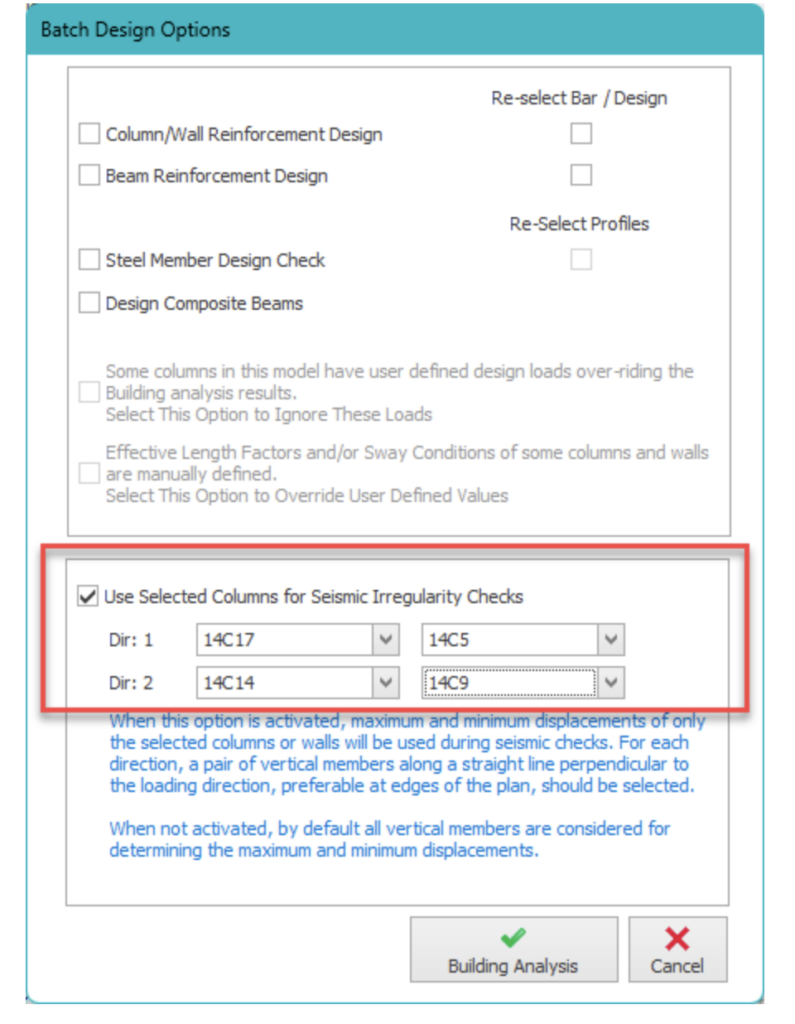
Engineers can now select specific columns or walls for seismic irregularity checks. Specifically, the software uses only these members to determine maximum and minimum displacements. Furthermore, engineers should position selected members along plan edges, perpendicular to the loading direction. When deactivated, the software defaults to all vertical members for backward compatibility.
This feature is particularly valuable on irregular floor plans. Therefore, it aligns ProtaStructure with the manual judgment experienced engineers apply to seismic code interpretation.
Pushover analysis: direction selection added
Engineers can now select specific analysis directions for Pushover Analysis: 0°, 90°, 180°, and 270°. Moreover, performance evaluation and reporting run independently for each selected direction. As a result, building assessments become more targeted and granular.
NSR R factor breakdown in reports
Post-Analysis Check Reports now include a detailed breakdown of the R factor for NSR projects. Specifically, this adds full transparency to seismic force reduction factor calculations. Furthermore, design checks and third-party audits become easier to verify and sign off.
EC8 q-factor calculation steps
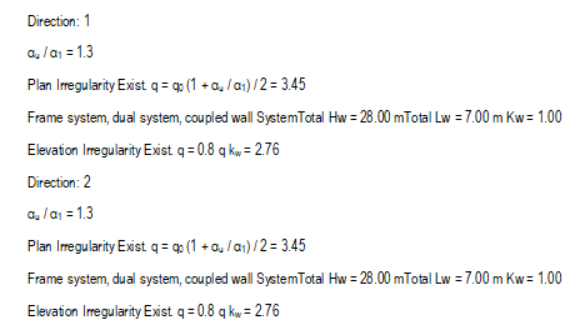
The Post-Analysis Checks Report for EC8 models now includes detailed calculation steps for the q-factor. Therefore, engineers working under Eurocode 8 can trace exactly how the behaviour factor derives. Moreover, this supports peer review and formal documentation requirements.
Torsional irregularity check: column labels added
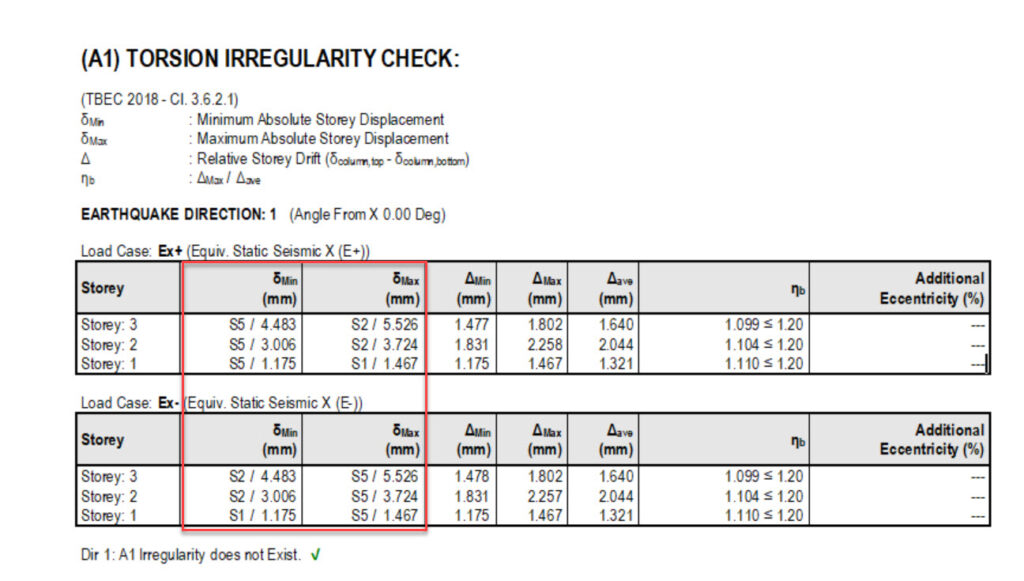
Column labels now appear next to maximum and minimum displacement values in the Torsional Irregularity Check table. As a result, engineers identify torsion-driving columns much faster. Furthermore, more targeted design decisions follow from this clearer visual output.
3. Reinforcement Detailing: Smarter Drawings, Less Manual Work
Automated reinforcement detailing is a core strength of ProtaStructure Suite. In addition, v9.0.455 reduces manual effort further across multiple detailing tasks. Consequently, engineers produce accurate, code-compliant drawings faster than before.
Beam reinforcement hatching in sections
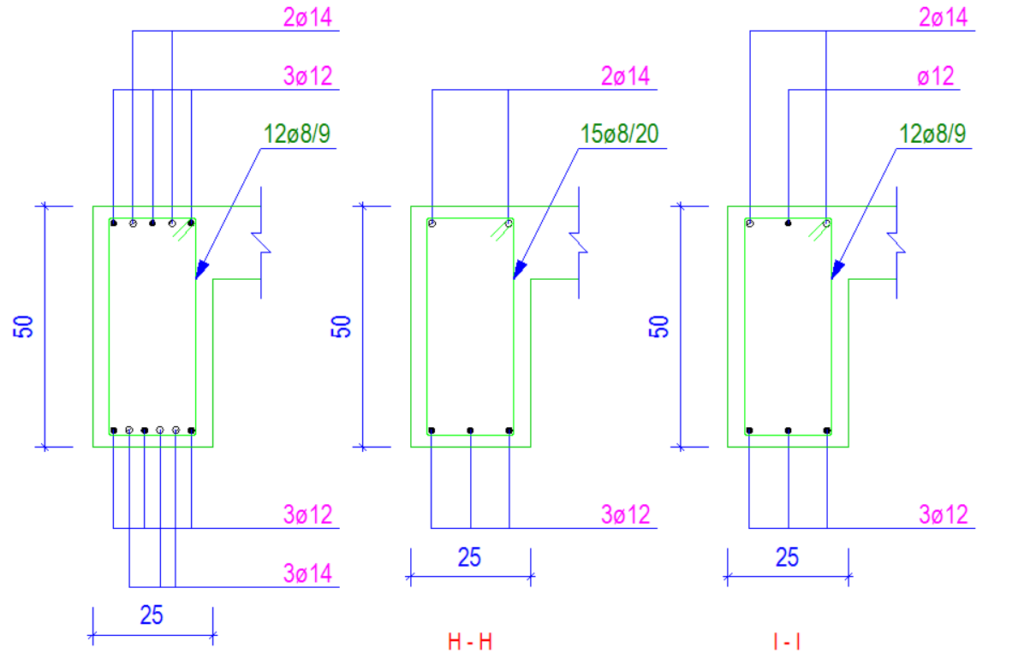
ProtaStructure now hatches beam reinforcement in section drawings. Therefore, rebar placement reads more clearly on construction documents. Moreover, this improvement directly addresses feedback from engineers and raises documentation quality.
All stirrups now shown in beam details
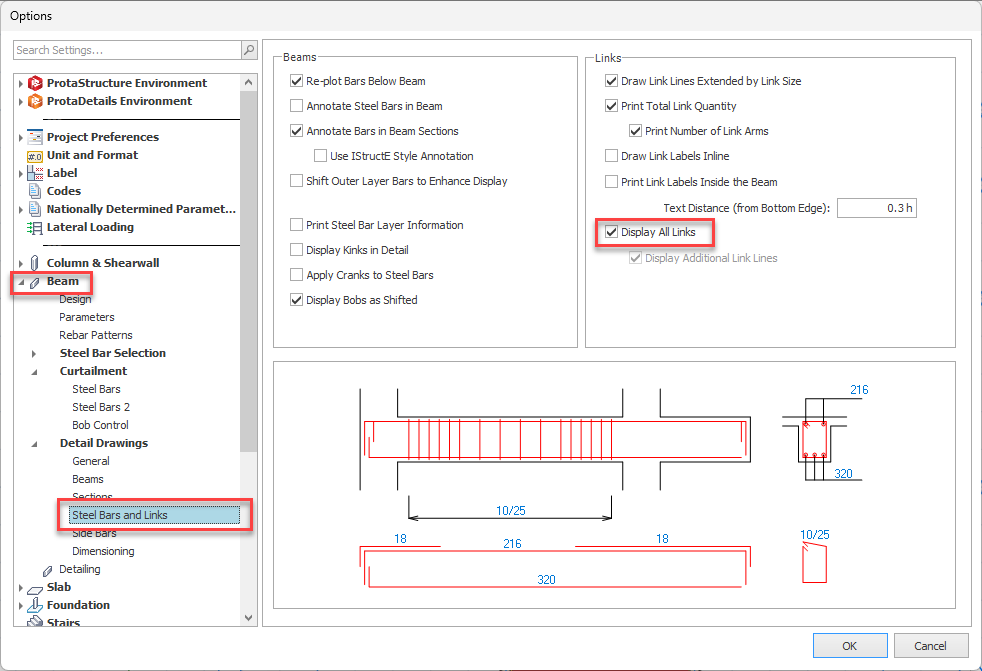
Engineers can now display all stirrups in beam detail drawings. Previously, drawings omitted some stirrups for visual simplicity. Now, however, full stirrup visibility supports accurate reinforcement scheduling. Furthermore, engineers retain complete control over what appears on each drawing.
Hanger bars calculation in detailed report
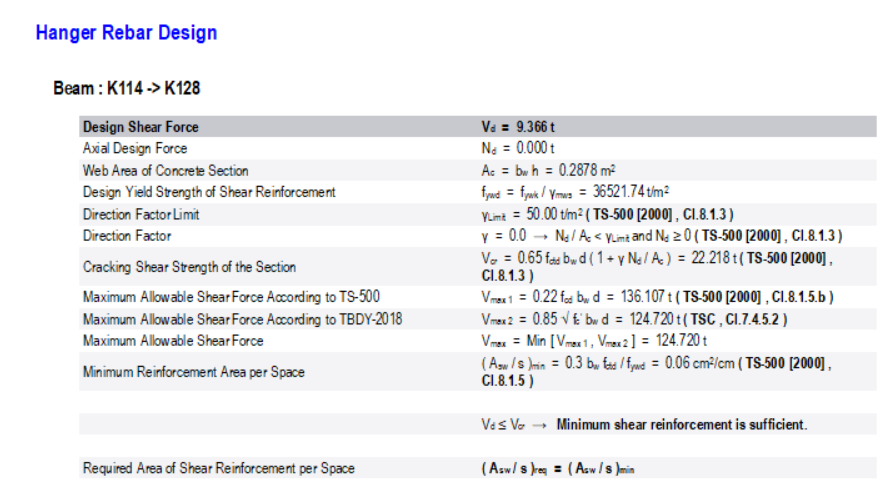
The detailed beam design report now includes hanger bar calculations. As a result, every reinforcement component gets documented transparently. Furthermore, this closes a previous gap in reporting completeness that engineers frequently flagged.
Reinforcement display for shear walls
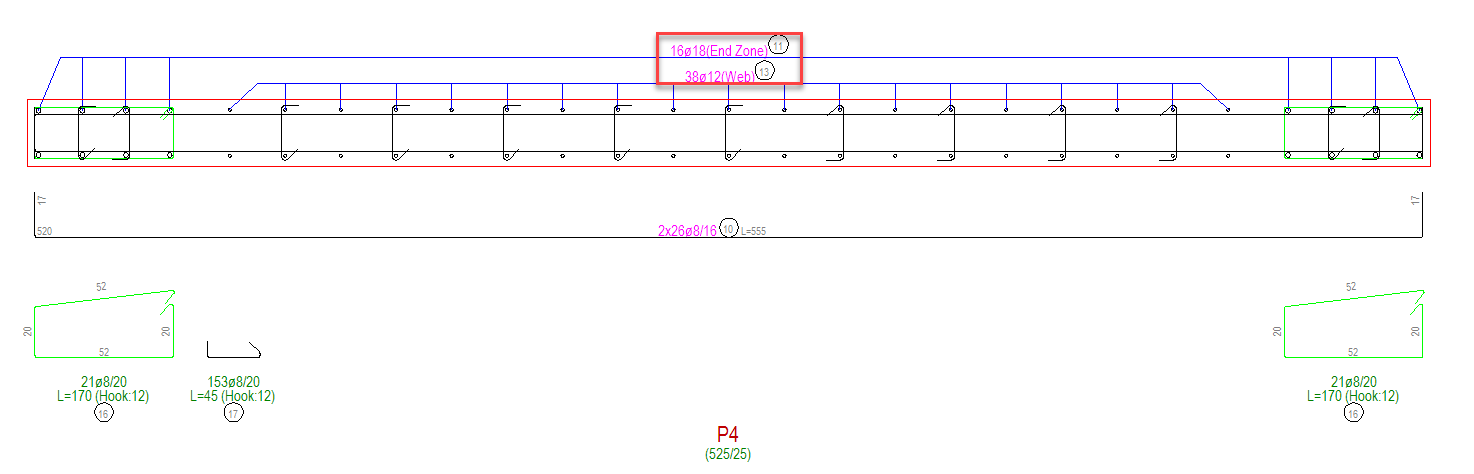
Shear wall elements now show full reinforcement display in ProtaStructure. Consequently, shearwall drawings match the visual detail already available for beams and columns. Moreover, projects with significant lateral load systems benefit most from this consistency.
TBDY 7.11.6 hole detail added to slabs
A reinforcement detail compliant with TBDY 7.11.6 is now available for slab openings. Therefore, Turkish code requirements around slab holes apply automatically. As a result, engineers no longer handle these details manually across projects.
Lapping location option in column elevation drawings
Ticket: No ticket number — Improvement
Image: see Gallery
A new option controls the longitudinal rebar lapping location in column elevation drawings. Specifically, engineers choose how and where lap splices appear in documentation.
Consequently, drawing output matches firm standards and project-specific requirements more precisely.
Staircase reinforcement hatching in section drawings
Hatching now applies to staircase reinforcement section drawings, not only beam sections. Therefore, staircase details reach the same visual clarity as beam drawings. As a result, construction documentation for stair structures becomes more consistent and easier to read on site.
4. Modelling and Graphical Editor: Productivity Enhancements
Beyond analysis and design, v9.0.455 improves day-to-day model building. Specifically, these changes make repetitive tasks faster and reduce geometry errors. Furthermore, right-click shortcuts put common actions one click away.
Continuous drawing commands
Drawing commands now stay active until the engineer presses ESC. Previously, each element placement required reactivating the command. Consequently, placing repetitive elements on large floor plans takes significantly less time. Moreover, this change reduces interruptions during complex modelling sessions.
Snap to member intersection points
A new option lets frame members snap precisely to member intersection points. Therefore, complex frame configurations carry fewer geometry errors. Furthermore, overall model accuracy improves, particularly on dense structural grids.
Update end conditions from right-click menu
ProtaStructure now includes “Update Column End Conditions” and “Update Beam End Conditions” in the right-click context menu. Specifically, these options appear when engineers select columns or beams. As a result, a commonly needed action takes one click instead of several menu steps.
Beam end releases explicitly displayed
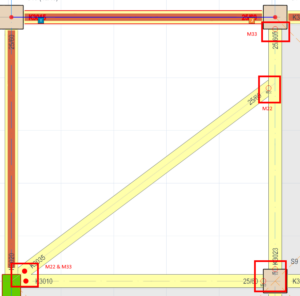
M22 or M33 moment releases now appear explicitly at beam ends when they do not coexist. Therefore, engineers quickly verify that end conditions are correct. Furthermore, potential modelling errors surface before analysis rather than after, saving rework time.
Cruciform column transfer to ProtaSteel improved
The transfer of cruciform columns to ProtaSteel now works more reliably. Moreover, the naming convention in the quantity table of materials has been improved. As a result, data handover between structural modelling and steel detailing workflows becomes cleaner and more consistent.
Convert Ribs to Beam warning message enhanced
The warning message for the Convert Ribs to Beam operation now provides clearer information. Therefore, engineers understand exactly what the conversion affects before confirming. Consequently, unintended model changes during this operation become less likely.
Extend frame to curved beam improved
The extend frame to member command now works more reliably when extending steel beams to curved beams. Therefore, engineers on architecturally complex steel projects experience fewer command failures. In short, this fix removes a persistent source of frustration on curved-geometry structures.
5. RC Beam Design: Expanded Checks and Reporting
In addition to RC column improvements, v9.0.455 delivers focused enhancements to RC beam design. Specifically, these updates produce earlier warnings, more complete reports, and broader code coverage. Consequently, beam design workflows become more reliable across multiple international standards.
Warning for insufficient web bar
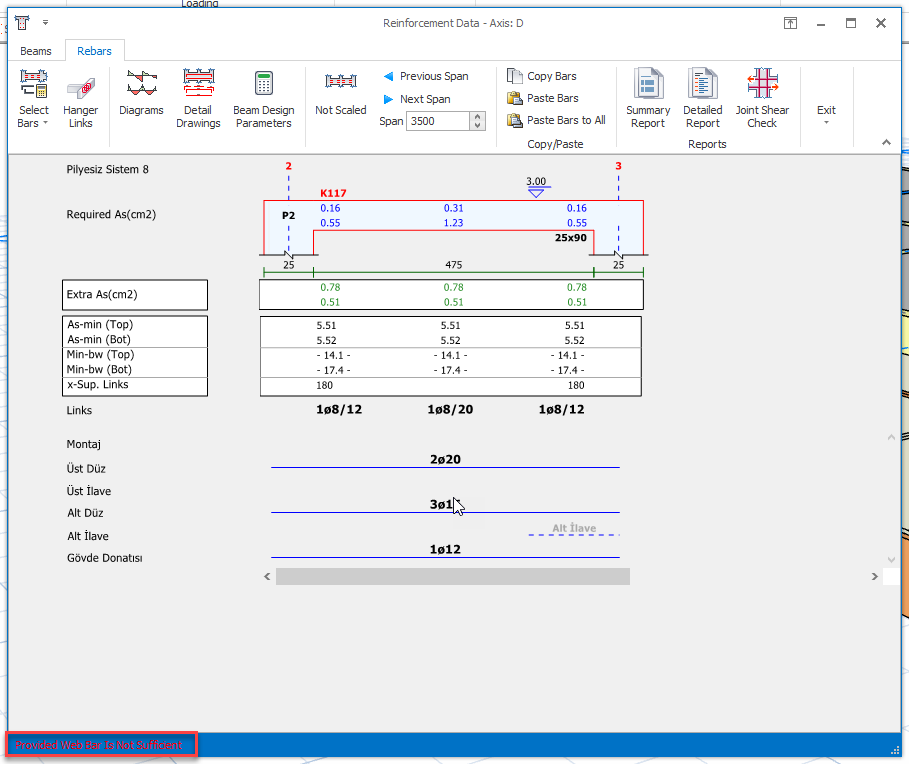
ProtaStructure now shows a warning in the beam design window when the web bar is insufficient. Therefore, engineers catch this issue immediately during design. Furthermore, this proactive alert prevents non-compliant reinforcement from reaching the documentation stage.
Foundation tie beam design for Indian codes
Foundation tie beam design now covers Indian codes fully. Therefore, engineers on IS-code projects no longer need manual workarounds for this common element. In short, this closes a significant gap for teams working in the Indian market.
EC8 5.4.2.2 shear force calculation in detailed report
The detailed beam design report now includes shear force calculations per EC8 clause 5.4.2.2. Specifically, this gives Eurocode engineers full traceability of capacity-based shear demands. Furthermore, peer review workflows that require calculation transparency benefit directly from this addition.
BS Standard Pattern-9 added
Standard Pattern-9, a pattern commonly used in British Standard projects, is now available as a load pattern option. As a result, engineers on BS-code projects apply this pattern directly without manual configuration. Moreover, this addition strengthens ProtaStructure’s coverage of UK market requirements.
Filter for failed beams enhanced
The failed beam filter in the beam design window now works with greater precision. Therefore, engineers isolate non-compliant beams more quickly on large models. Moreover, faster identification speeds up the design iteration cycle significantly.
Print marks preserved in design windows
Print marks in column and beam design windows now persist between sessions. As a result, engineers no longer reset print selections after reopening the design interface. Furthermore, selective printing workflows on large documentation sets become more efficient.
NSR Clause 15.13.3.1 check for foundation and tie beams
An additional compliance check for foundation beams and tie beams now covers NSR clause 15.13.3.1. Therefore, Colombian code engineers get more thorough verification for these elements. In short, this update reduces the risk of overlooking this specific NSR requirement.
6. Foundation and Punching Check Improvements
Foundation and punching check workflows receive several targeted improvements in v9.0.455. Consequently, engineers on pad footing, mat foundation, and punching-sensitive projects get more accurate checks and clearer reports.
One-way shear check enhanced for Indian code (IS-456)
The one-way shear check for pad footings now complies with Indian code IS-456. Therefore, IS-code engineers get fully aligned shear verification without manual post-processing. Moreover, this improvement removes a compliance gap that affected Indian market projects.
Column punching check improved for steel column foundations
The Column Punching Check report for FE mat foundations supporting steel columns has been improved. Furthermore, column dimensions now appear directly in the punching check report. As a result, reviewers verify punching geometry without cross-referencing separate model data.
Column dimensions in punching check report
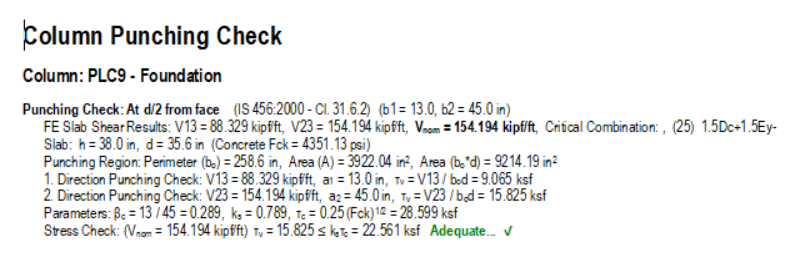
Column dimensions now appear inside the punching check report. Specifically, this makes the report fully self-contained for review purposes. Consequently, engineers and auditors no longer need to open the model to verify punching geometry.
NSR foundation tie beam enhancement (C15.13)
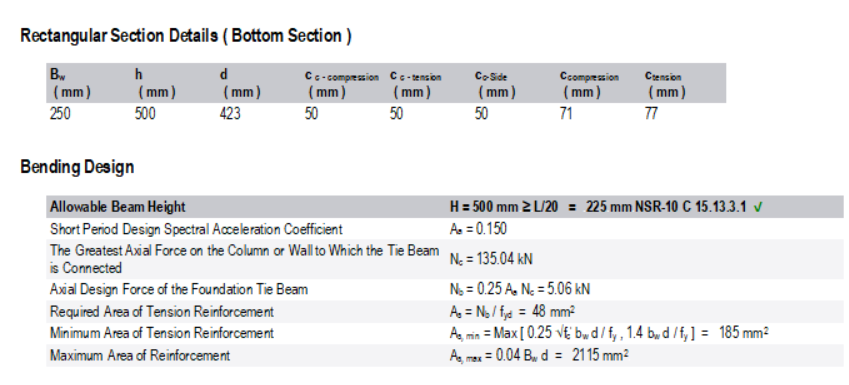
An enhancement covers foundation tie beams under NSR code clause C15.13. Moreover, this works together with the NSR 15.13.3.1 beam check to deliver comprehensive NSR foundation compliance. In short, Colombian code engineers benefit from more thorough and traceable foundation tie beam verification.
Punching check report expressions improved
The punching check report now uses clearer expressions and a better-structured layout. As a result, engineers read and interpret results more efficiently. Furthermore, faster comprehension supports quicker sign-off during design reviews.
7. Steel Design: New Section Types and Deflection Control
Steel design capabilities expand noticeably in v9.0.455. Specifically, new section types and more flexible deflection control give steel engineers greater design freedom. Moreover, these additions reduce reliance on workarounds for non-standard profiles.
New built-up section types in steel section catalog
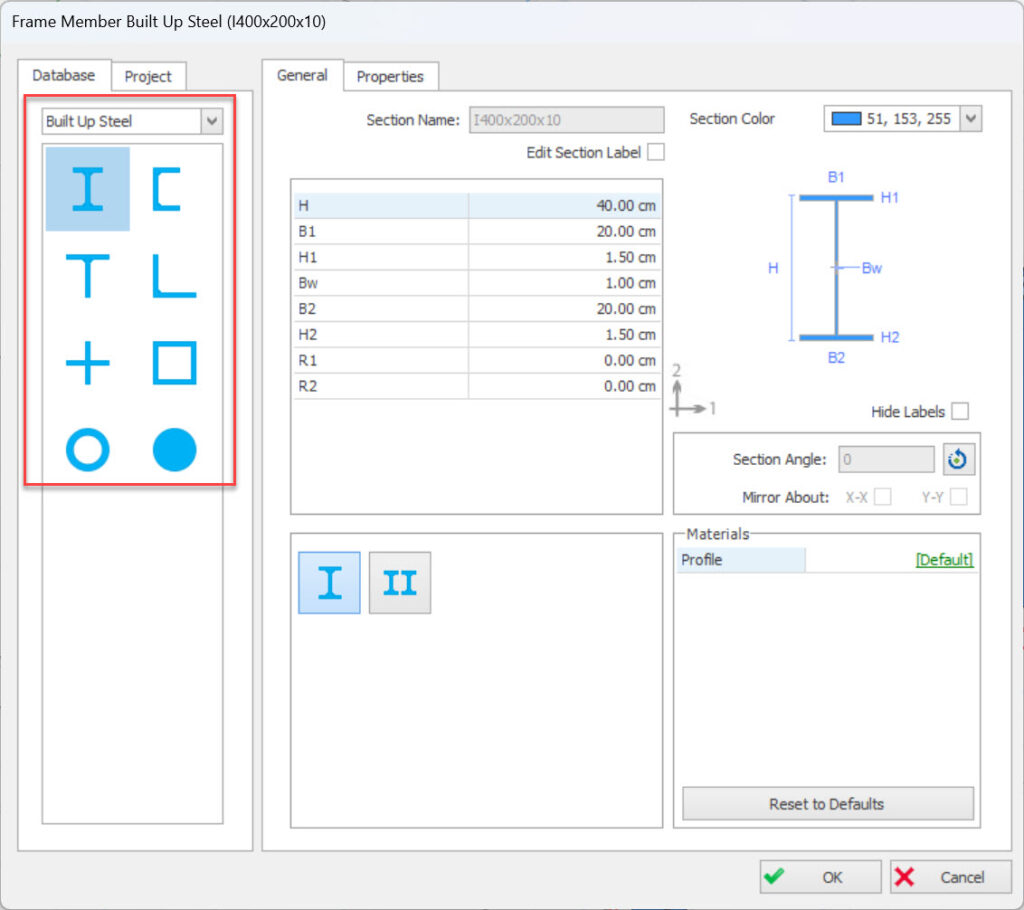
Three new built-up section types join the steel section catalog: steel rod section, cross (+) section, and T-section. Therefore, engineers working with custom or unconventional profiles now find these options directly in the software. Furthermore, this reduces the need for manual workarounds when designing with non-standard cross-sections.
Manual deflection category control for steel beams
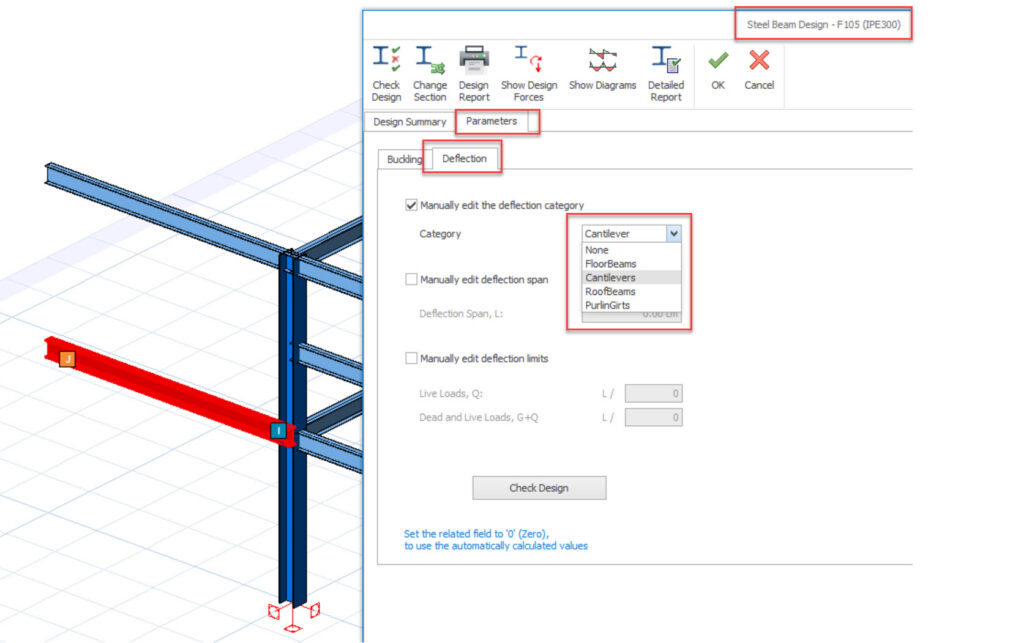
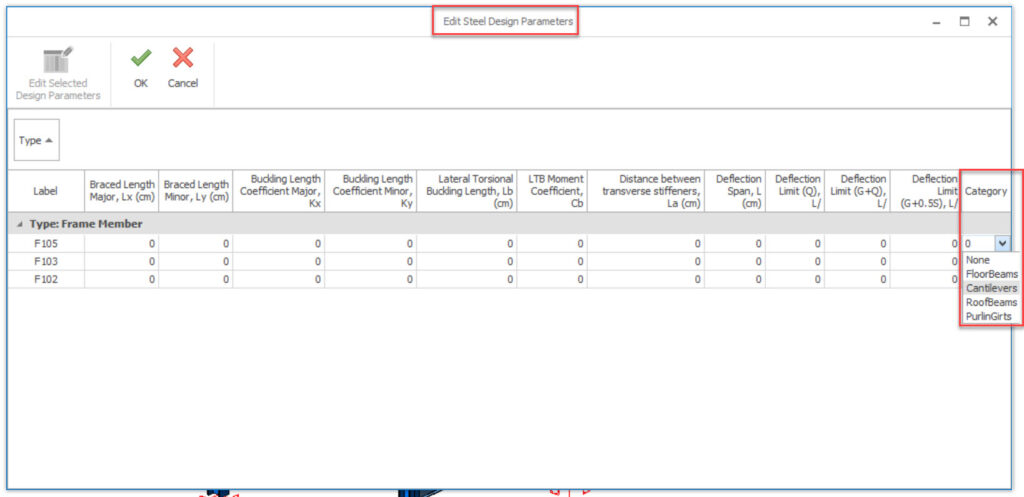
Engineers can now manually classify steel elements for deflection calculations: Roof Beam, Floor Beam, Cantilever, or Purlin/Girt. Specifically, deflection limits apply based on the assigned category. Moreover, batch editing through multi-element selection saves time on large steel structures. As a result, deflection verification becomes faster and more accurate across complex models.
Steel purlins and girts: chord selectability controlled
Purlin placement on the steel truss now controls which chord sections engineers can modify. Specifically, if purlins only sit on one chord, the software disables section modification for the other chord. Therefore, engineers avoid incorrect section assignments that could undermine truss design integrity.
Steel braces: new built-up section types
Steel rod, cross (+), and T-sections are now also available for steel brace design. Consequently, engineers designing brace members with non-standard profiles gain the same catalog options as beam and column design. Furthermore, this consistency across steel element types simplifies cross-section selection.
8. Reporting and Drawing Enhancements
Beyond analysis and design, v9.0.455 improves drawing output and report content. Specifically, these updates make construction documentation more accurate and easier to produce. Furthermore, several changes directly reduce the time engineers spend cross-referencing separate outputs.
Slab and beam loads on form plan detail drawings
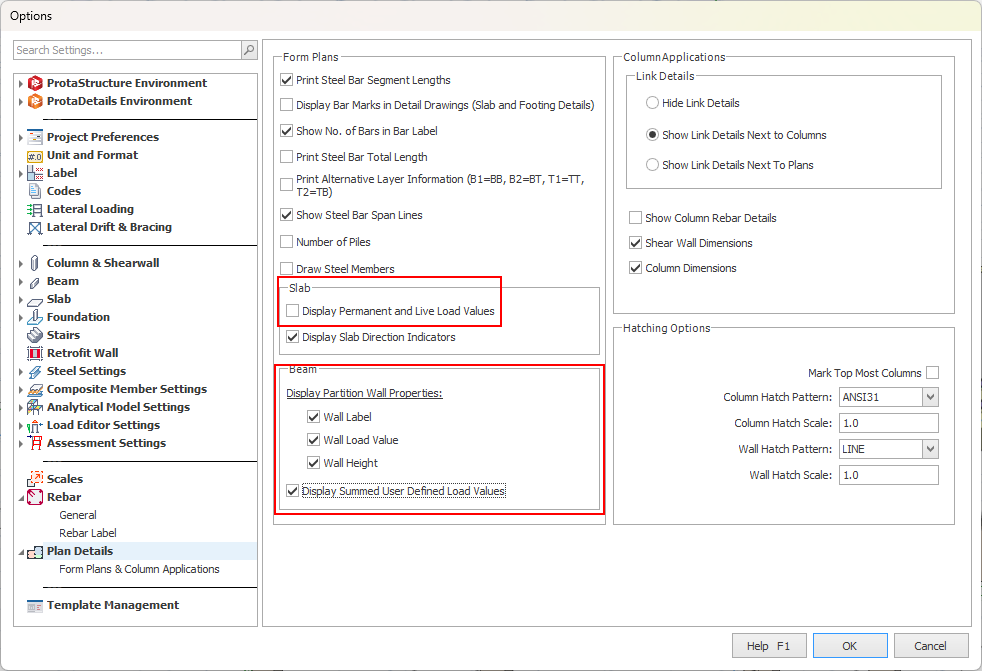
Engineers can now display slab and beam loads directly on form plan detail drawings. Previously, load verification required cross-referencing a separate load report. Now, however, load information appears on the drawing itself. As a result, design reviews become faster and load discrepancies are easier to catch early.
Ribbed slab load transfer added to load report
Loads on ribbed slabs now transfer to the structure during 3D structural analysis. Moreover, the load report documents this transfer explicitly. Consequently, engineers working with ribbed slab systems gain full visibility over how loads flow from slab to structure.
Foundation depth per element thickness in detail drawings
Detail drawings for columns and shear walls with different foundation thicknesses now show the correct depth for each element individually. Therefore, drawings no longer apply a uniform foundation depth across varying conditions. In short, this eliminates a common drawing error on projects with variable foundation levels.
Column application plan preview extended to Storey 0
Ticket: #66699
Image: #66699
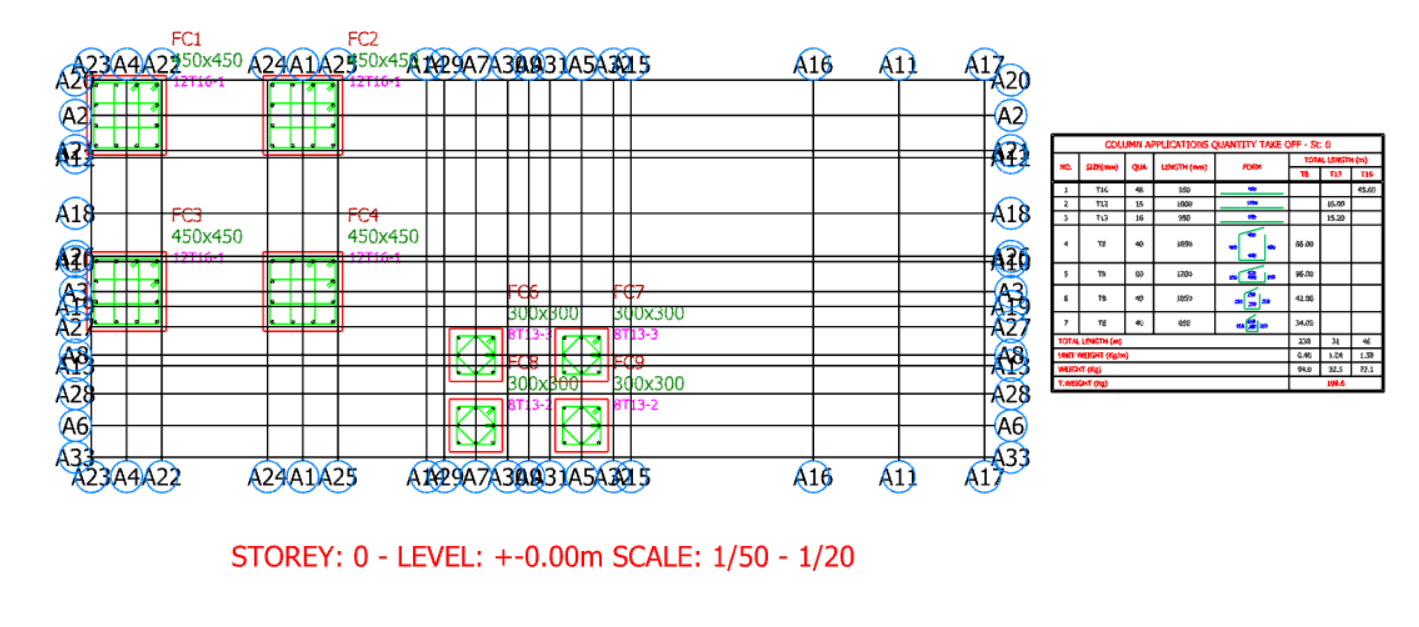
The column application plan preview now covers Storey 0 in addition to upper storeys. Consequently, engineers verify column placement at foundation level with the same tool they use above ground. Furthermore, consistent preview access across all storeys reduces oversight risk during detailing.
Composite slab FE Strip tooltip added
A tooltip now appears for the FE Strip type in the Slab Strip properties window. Therefore, engineers get immediate in-app guidance when configuring composite slab strip types. In short, this reduces the learning curve for new users and speeds up setup for experienced ones.
9. Summary: All Improvements at a Glance
| Module | Improvement | Benefit |
| RC Column Design | Editable Beta factors in main dialog | Faster slenderness checks |
| RC Column Design | SNI 2847:2019 compliance updates | Accurate Indonesian code output |
| RC Column Design | Tie bar option in design interface | Faster configuration |
| Seismic Analysis | User-selectable columns for irregularity | Greater design control |
| Seismic Analysis | Pushover direction selection | Targeted performance assessment |
| Seismic Analysis | NSR R factor & EC8 q-factor detail | Full calculation transparency |
| RC Beam Design | Web bar insufficiency warning | Earlier issue detection |
| RC Beam Design | EC8 5.4.2.2 shear force in report | Full Eurocode traceability |
| RC Beam Design | BS Standard Pattern-9 | British code compliance |
| Reinforcement | Beam & staircase section hatching | Clearer drawings |
| Reinforcement | All-stirrup display option | Accurate scheduling |
| Reinforcement | Hanger bars in detailed report | Complete documentation |
| Foundation | IS-456 one-way shear check | Indian code compliance |
| Foundation | NSR tie beam enhancement | Colombian code compliance |
| Punching | Column dimensions in report | Self-contained output |
| Steel | New built-up sections (rod, cross, T) | More section options |
| Steel | Manual deflection category control | Accurate limit checks |
| Modelling | Continuous drawing commands | Faster model building |
| Modelling | Snap to intersections | Fewer geometry errors |
| Reporting | Slab/beam loads on form plan drawings | Faster design reviews |
| Reporting | Ribbed slab load transfer in report | Full load transparency |
Why These Structural Analysis Software Improvements Matter in 2026
Structural engineering firms today face mounting pressure. Specifically, they must deliver projects faster, with fewer errors, and across more international codes than ever before. Consequently, software updates that target real workflow bottlenecks matter more than ever.
Consider the seismic irregularity check feature. Specifically, ProtaStructure now lets engineers choose which columns define the displacement envelope. As a result, the software aligns with experienced engineering judgment instead of forcing a rigid default. Meanwhile, continuous drawing commands and snap-to-intersection improvements may look minor at first glance. However, across a full project, they save hours of repetitive interaction.
In addition, reporting improvements matter more than they appear. For example, the EC8 q-factor steps, NSR R factor breakdown, and torsional irregularity column labels all actively support peer review. Furthermore, when a reviewer can trace every calculation step, approval cycles get shorter. Consequently, design confidence goes up as well.
In short, ProtaStructure v9.0.455 delivers immediate value to structural engineers. Moreover, it supports five major code environments: Eurocode, ASCE, SNI, NSR, and TBDY — all within a single platform. Therefore, engineers working across regulatory standards benefit from day one.
Who Benefits Most from v9.0.455?
Engineers working with international codes
Prota Software specifically targets four major code environments in this release: SNI (Indonesia), NSR (Colombia), Eurocode, and TBDY (Turkey). Therefore, firms across multiple jurisdictions find immediate value in v9.0.455. Furthermore, teams in markets with strict local audits benefit directly from these focused code updates. In short, no matter the regulatory environment, this release delivers something concrete.
Teams doing detailed RC design
Above all, Prota Software packed the highest number of improvements into RC column design and reinforcement detailing. Therefore, teams who focus on reinforced concrete buildings get the most out of v9.0.455. For instance, residential tower engineers benefit directly from the new column design dialog and hanger bar reporting. In addition, industrial structure teams gain from the improved shear wall reinforcement display. As a result, both project types see fewer manual steps and faster delivery. In short, if RC design drives your workload, this update delivers immediate value.
Engineers performing seismic assessments
Pushover direction selection and user-selectable columns for irregularity checks are significant additions. Specifically, they target engineers performing building performance assessments. Furthermore, teams on seismically sensitive projects gain more granular control over analysis setup and reporting.
Conclusion
ProtaStructure v9.0.455 is a strong example of structural analysis software improvement in 2026. Specifically, it goes beyond surface-level additions to tackle real engineering workflow challenges. Furthermore, smarter seismic controls, richer reporting, faster modelling tools, and more complete reinforcement documentation all strengthen ProtaStructure’s position as a comprehensive structural engineering platform.
Prota Software continues to refine the platform across 100+ countries. Moreover, releases like v9.0.455 demonstrate a consistent commitment to making engineers more productive, accurate, and confident. Consequently, upgrading to this version is a straightforward decision for any active ProtaStructure user.
Ready to explore the latest improvements? Download ProtaStructure v9.0.455 from the Prota Help Center or visit protasoftware.com to request a free 30-day trial.
Related Content (Internal Link Suggestions)
- ProtaStructure Suite 2026 — Full Feature Overview Release notes between 9.0.445 and 9.0.365 Total issues 142
- How to Perform Pushover Analysis in ProtaStructure: Step-by-Step Guide
- Seismic Irregularity Checks Explained: ProtaStructure and Eurocode 8
- Automated Reinforcement Detailing with ProtaDetails: What Engineers Need to Know
- Foundation Tie Beam Design in ProtaStructure: Indian and NSR Codes