

The measure command in ProtaStructure is significantly improved so that you can snap to any 2D and 3D points, including line intersections, solid object vertices, extensions, intelligent element points, axis intersections, and so on, and measure the distance between them.
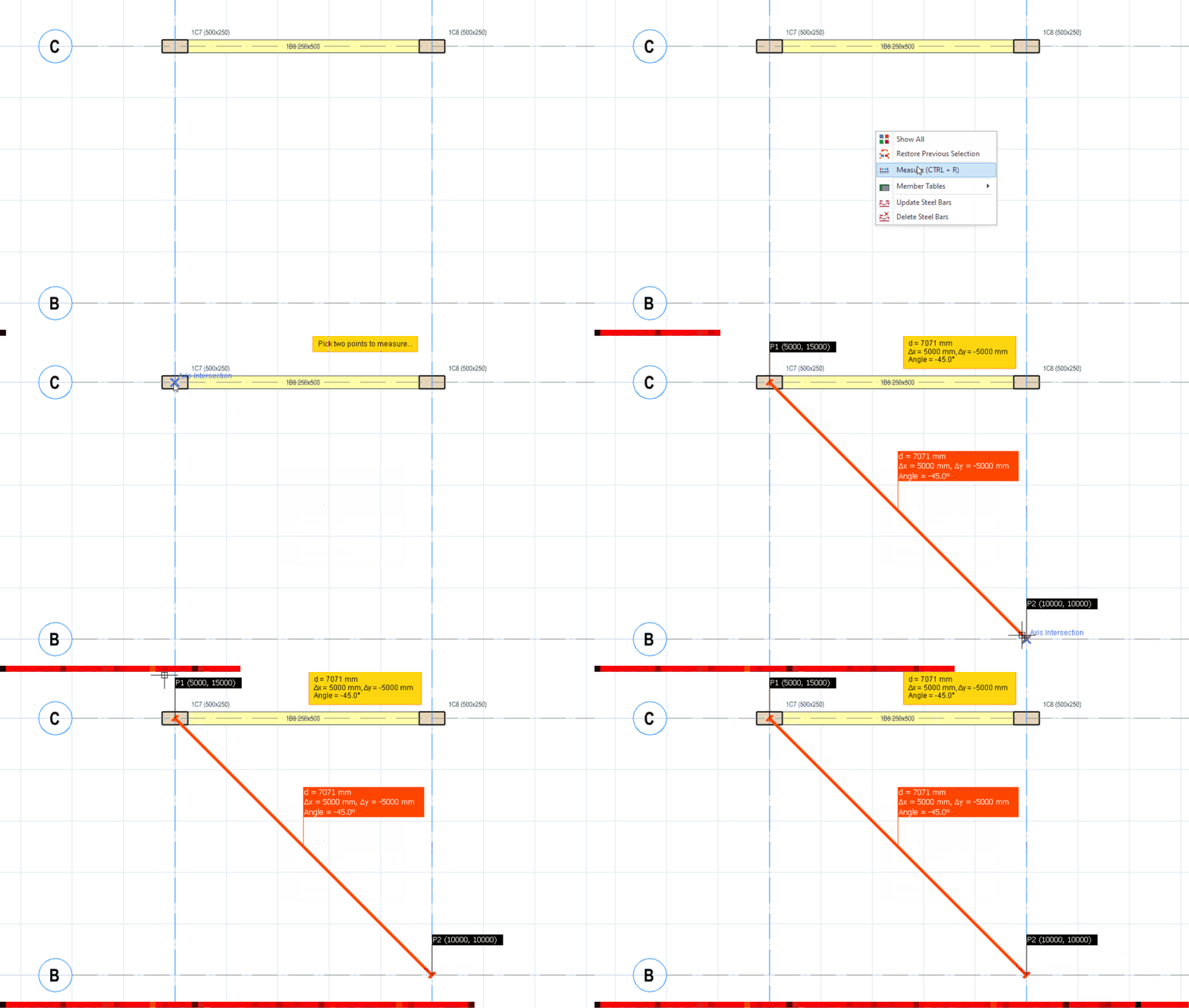
The measure command will immediately mark the points with coordinate labels and provide information on parameters like the Distance, Distance in X, Distance in Y, Distance in Z, Angle in XY Plane, and Angle from XY plane.
Measuring on a plan view will provide only relevant information such as Distance, Distance in X, Distance in Y, and Angle in XY Plane.

The results for the latest measurement will be displayed on a ‘Yellow Box’ at the top of the screen. All measurement information will persist on the screen until the measure command is canceled and the mouse wheel is scrolled.
To measure the distance between two points on plan view:
To measure the distance between two points in 3D view:
- Right-click anywhere in plan view or 3D view.
- Pick “Measure”
- Left click on the first point (e.g. intersection of axes)
- Place the mouse curson on the next point > The dimension and angle will automatically be shown real time.
- Left click on the second point