

Automatic backups of the model is done in the background on an hourly basis without user intervention. This backup is explained here : Backup Structural Model
There will be situations that you want to restore the backup manually, example when the model is corrupted and the model cannot be opened.
This can be done by manually restoring the backups from the folder DataBackup.
The DataBackup folder can be found within the same main folder path as where the project model is saved, i.e. within the Data Folder (parent folder). Example as shown below.

The DataBackup folder will contain the respective project backup file in Zip. file format (Refer to picture below) The backup file will display the project title, the back-up revision and the back-up dates in brackets.

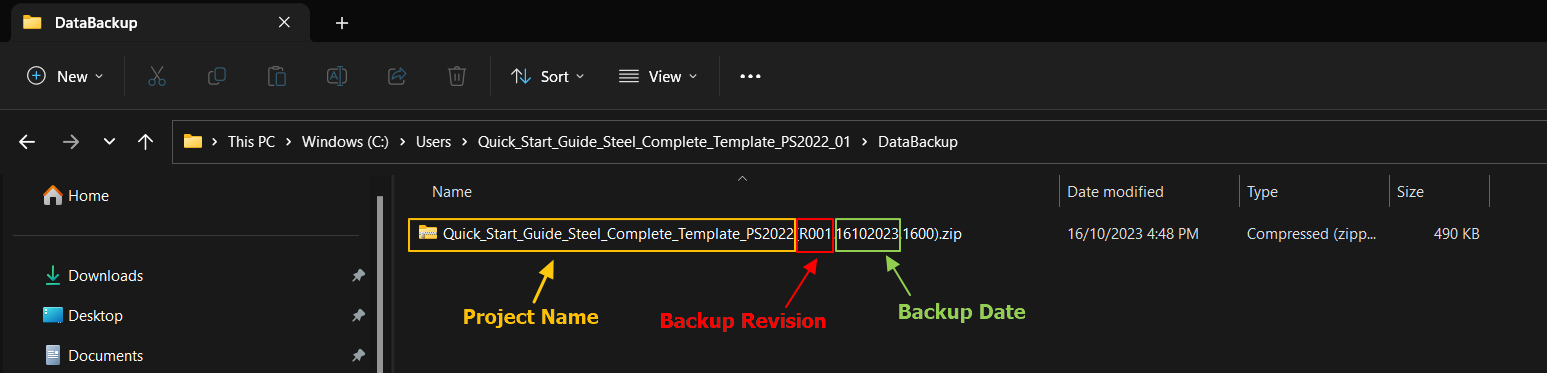
To retrieve the back up file you may follow one of these two options:
Option 1 :
- Extract the backup files to a specific folder destination using WinRAR or any other data compression tools.
Delete the extended name in brackets which includes the backup revision and backup dates. (This is important !)

The project folder name needs to be the same as the data files it contains for the software to be able to open the project.
Option 2 :
- Extract the data files directly to the respective folder destination using WinRAR or any other data compression tools.
- Click “Yes to All” when prompted to replace these data files.

The backup project can then be loaded successfully with ProtaStructure after the steps as stated above are performed accordingly.